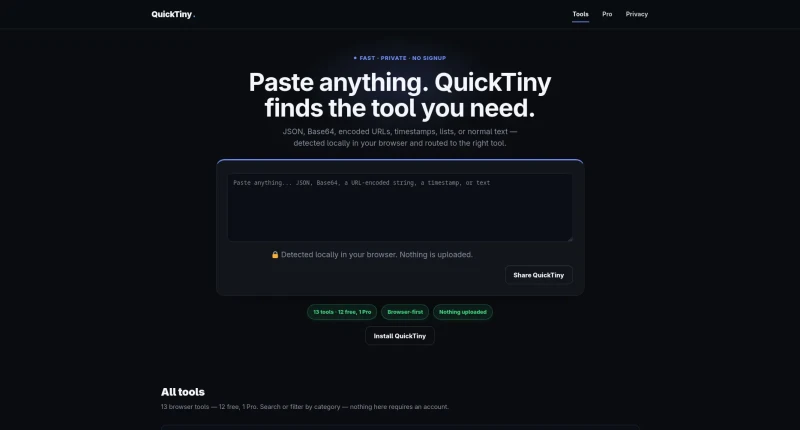

Free browser-local toolkit that detects pasted JSON, Base64, URLs or timestamps and routes to the right tool.
QuickTiny is a free, browser-local utility toolkit built around a paste-first workflow. Paste JSON, Base64, a URL-encoded string, a Unix timestamp, a list, or plain text into the input, and QuickTiny detects the format locally in your browser (no server upload) and routes you to the matching tool among 13 free utilities: JSON formatter, Base64 encode/decode, image compressor, case converter, and more. No signup is required for any tool, and all processing happens client-side, so pasted data never leaves the browser. It's aimed at web developers who want quick, disposable utilities without hunting through separate single-purpose sites for each format.
The main features and browser tools available on the platform include:
Smart Auto-Detection & Local Privacy: Automatically parses pasted content (JSON, Base64, encoded URLs, timestamps, lists, or normal text) client-side in your browser, keeping all data securely on your device without uploading anything.
Text & Content Cleanup Utilities: Includes tools to count words, characters, sentences, and lines, clean extra spaces and blank lines, convert text cases (UPPERCASE, Title Case, etc.), remove duplicate lines from lists, and sort lines alphabetically.
Data Transformation & Encoding: Provides dedicated tools for Base64 encoding/decoding, URL encoding/decoding, Unix timestamp conversion to human-readable dates, and a customizable password generator.
SEO & Formatting Tools: Features a JSON validator and beautifier with error feedback, along with an SEO slug generator to create clean URL strings.
In-Browser Image Compression (Free & Pro): Offers a free single-file JPG/PNG compressor, as well as a one-time $4.99 Pro tier for batch-compressing dozens of images at once directly in the browser with no recurring subscription.
You may also be interested in ...

Open Props

Dayjs