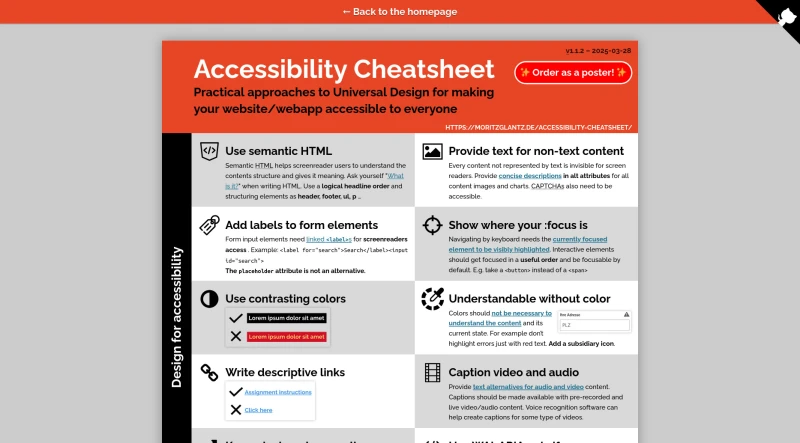
Practical approaches to Universal Design for making your website/webapp accessible to everyone.
This cheatsheet provides practical, open-source approaches (version 1.1.2, 2025-03-28) for making websites and web applications accessible to everyone.
Design for Accessibility Principles
Use Semantic HTML: Employ a logical headline order and structuring elements like
<header>,<footer>,<ul>, and<p>. Semantic HTML helps screen readers understand the content structure and meaning.Provide Text for Non-Text Content: All content not represented by text must be made visible to screen readers. This involves providing concise descriptions in
altattributes for content images and charts, and ensuring CAPTCHAs are also accessible.Label Form Elements: Form input elements require linked
<label>s for screen reader access (e.g.,<label for="search">Search</label><input id="search">). Theplaceholderattribute is not an alternative.Show Focus Visibility: When navigating by keyboard, the currently focused element must be visibly highlighted. Interactive elements should be focusable by default and focused in a useful order (e.g., use a
<button>instead of a<span>).Use Contrasting Colors: Ensure adequate color contrast.
Understandable Without Color: Colors should not be necessary to understand the content or its current state. For example, do not highlight errors solely with red text; add a subsidiary icon.
Write Descriptive Links: Links should be descriptive.
Caption Video and Audio: Provide text alternatives (captions) for both pre-recorded and live video and audio content. Voice recognition software can assist in creating captions.
Keep Pinch and Zoom Alive: Pinching to zoom is important for low vision and aging users. Use the
<meta name="viewport"statement withuser-scalable="yes". Avoid usinguser-scalable="no"andmaximum-scale: 1.Use WAI-ARIA Sparingly: WAI-ARIA should only be used if necessary, particularly for complex dynamic sites (such as single page applications). Semantic HTML should always be considered before using WAI-ARIA.
Methods for Testing Accessibility
Zoom to 400%: Use the browser or document viewer zoom to verify that all text remains visible.
Check Keyboard Navigation: Navigate solely using the standard keyboard keys: ← ↑ ↓ →, TAB, SHIFT+TAB, ESC, SPACE, and ENTER.
Use a Screen-Reader: Turn off the monitor and use a screen reader, such as Apple Voiceover or NVDA on Windows.
Run Lighthouse Audit: Execute the Lighthouse accessibility audit, which is located in the “Audits” section inside of the Chrome DevTools.
Deactivate CSS: Check if the document structure still makes sense when CSS is deactivated.
You may also be interested in ...
Iro JS
Pollen