Ire Aderinokun, Frontend Developer and User Interface Designer, explains in this post how display:content really works.
The principal characteristics of the CSS rule display: contents are centered around controlling the element's box generation without affecting its content or underlying structure.
1. Core Functionality and Visual Effect
Box Omission: When
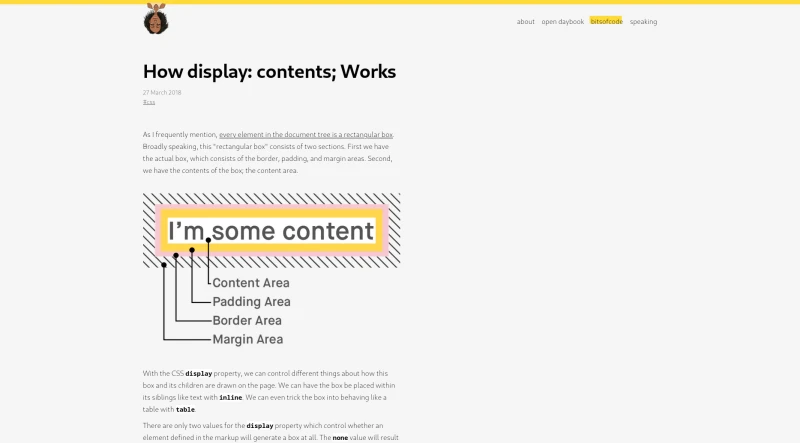
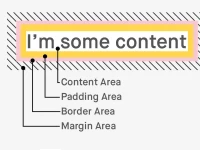
display: contentsis applied, the surrounding rectangular box of the element is omitted entirely. This box normally consists of the border, padding, and margin areas.Content Display: The contents of the box (the content area) are drawn as normal.
Conceptual Replacement: For the purposes of box generation and layout, the element is treated as if it had been replaced in the element tree by its contents. Visually, this is the same as imagining the element's opening and closing tags were omitted from the markup.
Contrast with
display: none: Unlikedisplay: none, which prevents both the box and its contents from being drawn,display: contentsonly affects the box visually.
2. Interaction and Non-Visual Behavior
The rule primarily affects the visual representation; it does not affect the underlying markup within the document.
Attributes and Targeting: The element still exists in the document and can still be selected, targeted, and interacted with using its attributes (e.g., ID). For instance, it can still be referenced using
aria-labelledby.JavaScript Events: Event listeners set on the element (like a click event) will still trigger normally. Interaction is possible because the contents are visible.
Pseudo-Elements: Pseudo-elements (
::beforeand::after) are considered part of the element’s children and are displayed as normal.Navigation Limitations: One notable issue is that users can no longer navigate to the element using a fragment identifier (hash link).
3. Special Behaviors for Certain Element Types
For elements whose appearance is determined by external resources or complex internal structures, display: contents behaves differently:
Replaced Elements: For elements like images (
<img>), which are controlled by external resources, applyingdisplay: contentsfunctions exactly likedisplay: none. The entire box and contents are not drawn.Complex Form Elements: For many form elements (such as
<select>,<input>, and<textarea>), which are composed of several smaller elements rather than a single "box,"display: contentsalso functions exactly likedisplay: none.Buttons and Links: These elements do not have special behavior. The surrounding box is removed, but the content remains visible. Links still function for navigation, and buttons still attempt to submit a form if used within one.
4. Utility and Use Cases
Semantic Layout Solution: This rule is useful for resolving conflicts between the need for semantic HTML structure (e.g., grouping content within an
<article>) and the requirements of modern CSS layout systems, such as CSS Grid Layout.Enabling Direct Sibling Styling: CSS Grid often requires elements to be direct siblings to function correctly. By applying
display: contentsto wrapping elements (like<article>), the wrapper's children are treated as if they were direct siblings of the grid container, allowing complex layouts (like ensuring matched height sections across multiple cards) while preserving semantic grouping.
5. Browser Support
At the time the source was written,
display: contentswas only supported in two major browsers.It should currently be treated as a progressive enhancement, and developers should use appropriate fallbacks (e.g., using
@supportsCSS queries).
You may also be interested in ...
Stolon

Chaarts

Master CSS