Windows/macOS/Linux GUI client for GIT users.
SourceGit is an open-source, free, and fast Git GUI client designed for Windows, macOS, and Linux users. It provides a comprehensive graphical interface to manage Git repositories without relying solely on the command line.
The principal functionalities of this tool include:
1. Comprehensive Git Command Suite
Core Operations: It provides a GUI for standard commands such as Clone, Fetch, Pull, Push, Merge, and Rebase.
Advanced Management: Users can handle complex tasks like Interactive Rebase, Cherry-pick, Revert, and Reset.
Commit Control: It supports Amend, Reword, and Squash operations to maintain a clean commit history.
Workflow Support: Includes built-in support for GitFlow, Git LFS, and Bisect for debugging.
2. Visualization and Code Review
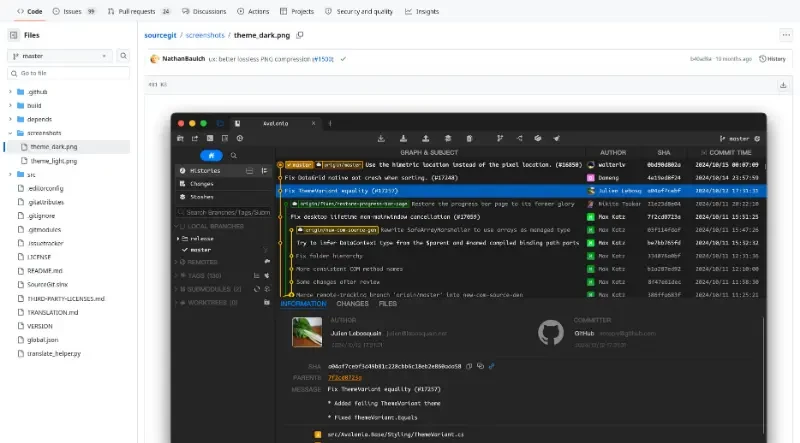
Commit Graph: Features a visual commit graph to easily track branch history and merges.
Detailed Diffs: Offers robust diffing tools, including Revision Diffs, Branch Diffs, and specialized Image Diffs (Side-By-Side, Swipe, and Blend modes).
History and Blame: Users can view file histories and use the "Blame" feature to identify who made specific changes.
3. AI and Productivity Helpers
AI Commit Messages: The tool can integrate with OpenAI or compatible APIs (like Ollama) to automatically generate commit messages.
Conventional Commits: It includes a helper for Conventional Commits and allows users to define their own commit types per repository.
Issue Linking: Supports linking commits to specific issues for better project tracking.
4. Integration and Extensibility
Platform Connectivity: Allows for the creation of Pull Requests directly on platforms like GitHub, GitLab, Gitea, Gitee, and Bitbucket.
External Tool Support: It can open repositories in external editors such as Visual Studio Code, Sublime Text, JetBrains IDEs, and more.
Custom Actions: Users can define Custom Actions to extend the functionality of the client.
5. UI and Accessibility
Theming: Includes built-in light and dark themes, with the option for users to create and share custom themes.
Multi-language Support: The interface is localized in numerous languages, including English, French, German, Spanish, Chinese, Japanese, and Korean.
Cross-Platform Performance: Built with C# and tested on multiple operating systems (specifically Debian 12 for Linux).
You may also be interested in ...
Gitfiend
Beercss