This VSCode extension make debugging much easier by automating the operation of writing meaningful log message.
Turbo Console Log is a popular Visual Studio Code extension designed to automate the process of writing and managing meaningful debugging log messages in JavaScript and TypeScript.
The main features and capabilities of Turbo Console Log include:
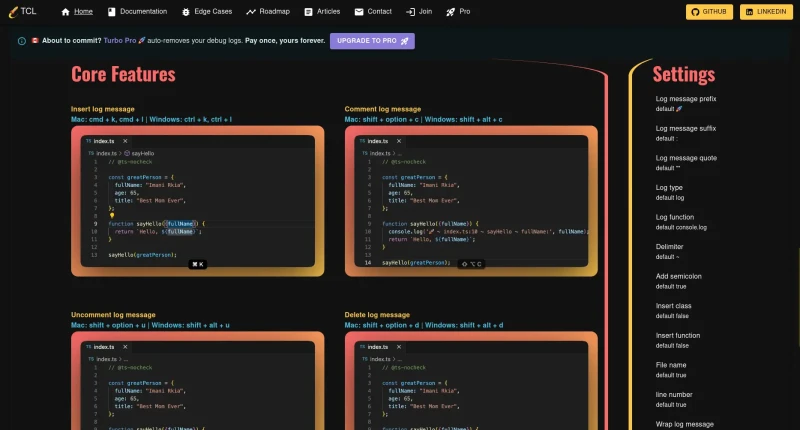
Automated Log Insertion: Automatically generates and inserts detailed
console.logstatements for selected variables or expressions using quick keyboard shortcuts (Cmd+K, Cmd+Lon Mac /Ctrl+K, Ctrl+Lon Windows).Bulk Log Management: Provides dedicated shortcuts to comment (
Shift+Option+C/Shift+Alt+C), uncomment (Shift+Option+U/Shift+Alt+U), delete (Shift+Option+D/Shift+Alt+D), or correct (Shift+Option+X/Shift+Alt+X) log messages created by the extension.Precision Placement Engine: Includes an insertion engine hardened against complex code patterns to place logs on the exact correct line, avoiding errors like placing logs inside object literals, after return statements, or outside variable scope.
Customizable Formatting & Context: Allows extensive configuration of log prefixes (defaulting to 🚀), suffixes, delimiters, quotes, and toggles to automatically include file names, line numbers, enclosing function names, and class names.
Pro Edition Workflow Features: Offers an upgraded tier with auto-cleanup of debug logs upon git commit, workspace-wide log tree views, instant search, filtering, and bulk removal tools.

You may also be interested in ...

VSCode Stripe Extension

Start developing websites like it's 2025