Unicode wireframe design tool.
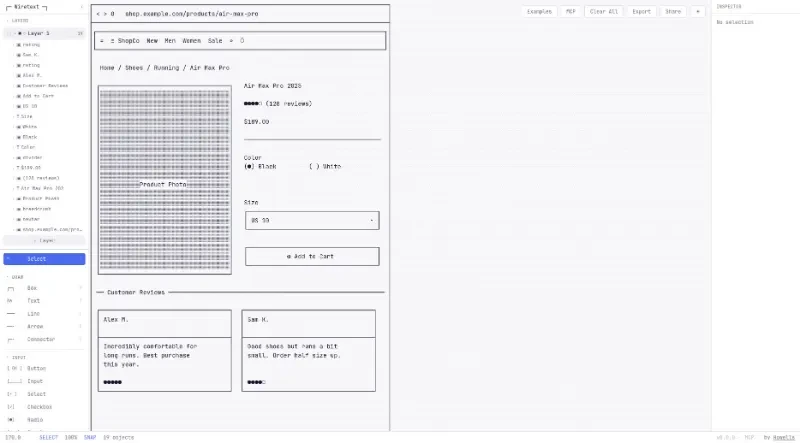
Wiretext is a Unicode-based wireframe design tool that allows creators to "draw with text," using standard characters to build visual layouts.
The principal functionalities of this tool include:
1. Text-Based Drawing and Annotation
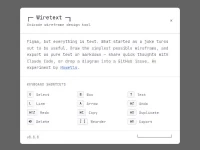
Standard Shapes: Users can quickly draw boxes, lines, arrows, and connectors using specific keyboard shortcuts (B, L, A, C).
Direct Text Input: A dedicated text tool (shortcut T) allows for adding labels and descriptions directly within the wireframe.
Selection and Movement: Users can use a select tool (shortcut V) to manage objects, with support for moving items via the space bar and arrow keys.
2. Comprehensive UI and Input Components
Form Elements: It features a library of common interactive inputs, including Buttons, Input fields, Select menus, Checkboxes, Radio buttons, and Toggles.
Layout Structures: Users can insert complex UI structures like Tables, Modals, Browser windows, and Cards to define the hierarchy of a page.
3. Rich Display and Navigation Elements
Site Navigation: Includes specialized components for building Navbars, Tabs, Breadcrumbs, and Lists.
Visual Indicators: Provides placeholders for Icons, Images, Avatars, and Progress bars, as well as alert boxes for system messages.
Prototyping Assets: Includes specialized elements like Rating stars, Steppers, and Skeletons to represent loading states or user feedback in a design.
4. Design Workflow and Export
Layer Management: A dedicated "Layers" panel allows users to organize, toggle visibility, and manage the stacking order of various design elements.
Inspector and Precision: The interface includes an Inspector for checking selection details, along with snap-to-grid functionality for alignment.
Sharing and Utility: The tool provides options to Clear All, Export the final design, or Share it with others.
You may also be interested in ...

Flowbite
ProseMirror