
Open Source & Free Tools for Web Workers

Discover amazing tech resources, carefully handpicked to keep you up-to-date and elevate your efficiency. Already 1476 badass resources curated.

  • happyconf.net
    Sponsor

    happyconf.net

    Animated slideshows to showcase your speakers, sponsors, organisers, announcements and quotes. Plus handy tools to make your life easier: a remote-controlled countdown timer, a clock, and a prize draw for attendees.
    Read more
  • happyconf.net
    happyconf.net happyconf.net happyconf.net happyconf.net happyconf.net happyconf.net happyconf.net happyconf.net

    Animated slideshows to showcase your speakers, sponsors, organisers, announcements and quotes. Plus handy tools to make your life easier: a remote-controlled countdown timer, a clock, and a prize draw for attendees.

    happyconf.net is a web-based platform designed to transform inactive conference screens into professional, animated displays and provide organizers with practical event management tools.

    The main features of this service include:

    • Animated Slideshows: It allows organizers to create elegant presentations to highlight speakers, showcase sponsors, share announcements, and display quotes from the event.

    • Integrated Event Utilities: Beyond slides, the platform includes a remote-controlled countdown timer, a large room clock, and a fair prize draw system to entertain and inform attendees during breaks.

    • Web-Based and Installation-Free: The service runs entirely in a web browser, requiring no software installation; it can be projected onto any connected screen, TV, or projector.

    • Professional Visual Themes: Users can choose from ready-made themes like "Cyberpunk," "Glassy," or "Romantic," or request a fully custom theme to match their specific graphic identity.

    • Real-Time Dashboard: Content is managed through a private admin area, and the public display updates in real time as changes are made.

    • Event-Based Pricing Model: Instead of a recurring subscription, it offers a "pay-per-event" system with tiers (Starter, Pro, and Custom) tailored to different event sizes, from small meetups to large professional conferences.

    • Privacy and Data Sovereignty: To display content, a login is required; once an event is over, all user data is typically deleted to ensure privacy.

  • Marko
    October 30, 2018

    Marko

    Marko, a friendly (and fast!) UI library from eBay that makes building web apps fun.

    Read more
  • Marko
    Marko Marko Marko Marko

    Marko, a friendly (and fast!) UI library from eBay that makes building web apps fun.

    Marko is a declarative, HTML-based language designed to make building web apps fun. Marko is utilized for creating dynamic and reactive user interfaces.

    The principal functionalities and features of Marko are:

    Core Language and Architecture

    • HTML Re-imagined: Marko extends standard HTML, meaning almost any valid HTML is valid Marko, but it enables building modern applications in a declarative way.

    • Familiarity: It is familiar to developers who know HTML, CSS, and JavaScript.

    • Scalability: It is scalable, supporting everything from simple HTML templates to powerful components as needed.

    • Trust/Usage: It is trusted, powering high-traffic, production-grade websites such as eBay.com.

    Performance and Optimization

    • High Performance: Marko is performant, featuring streaming, resumable capabilities, an optimizing compiler, and a tiny runtime.

    • Faster First Paint (Streaming): It streams content to users as soon as it is ready, avoiding the wait for client-side JavaScript bundles or data requests to start rendering. HTML, assets, and images are loaded as quickly as possible, with asynchronous content loading finishing as it completes.

    • Granular by Design: The architecture is designed to be lean by default and fast. It ships only necessary code, skipping hydration and stripping unused code at the sub-template level, offering unrivaled performance on any device or network.

    • Environment Optimization: Marko compiles templates to produce optimized, environment-specific output.

      • It generates Streamed HTML for the server.

      • It generates Reactive DOM for the browser.

      • This results in faster loads and smaller bundles.

    Developer Experience and Tooling

    • Typescript Support: Marko has built-in TypeScript support.

    • Strong Type Inference: It provides strong type inference that works across templates and components.

    • Full Editor Features: Editors receive full language features, including autocompletion, jump-to-definition, syntax highlighting, and clean formatting.

    • Quality Assurance: The platform helps developers build confidently, catch errors early, and write better code, faster.

    • Built-in Tags: It supports built-in HTML tags (like <div>) and core <script> tags, providing access to essential DOM methods like addEventListener, animate, append, appendChild, and focus.

  • ProBot
    October 30, 2018

    ProBot

    GitHub Apps to automate and improve your workflow. Use pre-built apps to extend GitHub, and easily build and share your own.

    Read more
  • ProBot
    ProBot ProBot

    GitHub Apps to automate and improve your workflow. Use pre-built apps to extend GitHub, and easily build and share your own.

    Probot is an infrastructure designed for creating GitHub Apps to automate and improve your workflow.

    The principal functionalities of Probot are twofold:

    1. Workflow Automation via Apps

    Probot allows users to Use pre-built apps to extend GitHub or to easily build and share your own. These apps function as first class actors within GitHub and automate common development tasks:

    • Release Management: Drafting release notes as pull requests are merged into the main branch (e.g., using Release Drafter).

    • Code Quality & Review: Offering functionalities like a Code review bot powered by ChatGPT.

    • Pull Request Management:

      • Preventing the merging of Pull Requests based on defined configurations (e.g., using Mergeable).

      • Preventing the merging of Pull Requests that contain "WIP" (Work In Progress) in the title.

      • Keeping repository forks up-to-date (e.g., using Pull).

    • Configuration Management: Allowing the use of Pull Requests to manage repository settings (e.g., using Settings).

    • General Interaction: Apps can listen for GitHub events (like issues.opened) and perform automated actions, such as creating comments.

    2. Development and API Features

    Probot provides a platform optimized for developers looking to build custom automation tools:

    • GitHub Optimization: Probot is Optimized for GitHub. Apps are designed to Receive webhooks and use the authenticated client to access the GitHub API.

    • Security: It enforces Granular permissions, ensuring each app only accesses the data it needs and nothing more.

    • Ease of Scripting: It is Easily scriptable using a simple API built on the latest ES6 JavaScript features, allowing developers to Focus on what you want to build by hiding unnecessary details.

  • Huginn
    October 30, 2018

    Huginn

    Huginn is a system for building agents that perform automated tasks for you online. They can read the web, watch for events, and take actions on your behalf. Think of it as a hackable version of IFTTT or Zapier on your own server.

    Read more
  • Huginn
    Huginn

    Huginn is a system for building agents that perform automated tasks for you online. They can read the web, watch for events, and take actions on your behalf. Think of it as a hackable version of IFTTT or Zapier on your own server.

    Huginn is an Open Source system designed to create agents that monitor and act on your behalf. It functions as a hackable version of IFTTT or Zapier running on your own server, ensuring that you always know who has your data.

    The principal functionalities of Huginn are centered around automated task performance using software "Agents" that create and consume events:

    Core Automation and Monitoring

    • Web Monitoring and Scraping: Huginn agents can read the web, watch for events, and take actions on your behalf. Specifically, they can scrape websites and receive email when they change.

    • Event Tracking and Notification: Agents can track the weather and send email alerts (e.g., when it is going to rain). They can also track counts of high frequency events (like "san francisco emergency") and send an SMS moments when they spike.

    • Social Media Monitoring: Huginn can watch for changes in the occurrence of terms on Twitter and send an email when the discussion volume changes. It can also follow your project names on Twitter and provide updates when people mention them.

    • Deal Watching: It can watch for air travel or shopping deals.

    • Digest Creation: Users can send digest emails with collected information at specific times.

    • Location Tracking: Agents can track your location over time.

    Integration and Customization

    • Extensive Connectivity: Huginn can connect to and integrate with numerous external services and protocols, including Adioso, HipChat, FTP, IMAP, Jabber, JIRA, MQTT, nextbus, Pushbullet, Pushover, RSS, Bash, Slack, StubHub, translation APIs, Twilio, Twitter, and Weibo, among others.

    • WebHooks: It can send and receive WebHooks.

    • Scripting and Logic: Huginn allows users to run custom JavaScript or CoffeeScript functions.

    • Complex Workflows: It can create Amazon Mechanical Turk workflows using the "HumanTaskAgent".

    • Agent Development: Complex and specific agents can be written as external gems and added to the Huginn installation.

    Deployment and Technical Features

    • Self-Hosted and Secure: Huginn is designed to run on your own server.

    • Installation Options: The easiest way to deploy is using the official Docker image. It can also be deployed locally (requiring MySQL or PostgreSQL).

    • Cloud Deployment: Detailed deployment strategies are available for providers such as Heroku (on a paid subscription plan) and OpenShift Online (using specific JSON templates).

    • Technology Stack: The core repository is primarily built using Ruby (89.0%), with contributions in HTML (7.6%) and JavaScript (2.2%).

    • Licensing: Huginn is provided under the MIT License.

  • November 6, 2018

    Freelance Junior Graphic/Web Designer

    Business is good so we're looking for a freelance junior or mid-level versatile designer who can design print, digital and web to join our growing team.

    Read more
  • Email foundation
    November 6, 2018

    Email foundation

    Foundation for Emails 2. Quickly create responsive HTML emails that work. Even on Outlook!

    Read more
  • Email foundation
    Email foundation Email foundation Email foundation

    Foundation for Emails 2. Quickly create responsive HTML emails that work. Even on Outlook!

    Foundation for Emails 2 (formerly known as Ink), is a Responsive Email Framework created by ZURB. It is designed to quickly create responsive HTML emails that are guaranteed to work across major email clients, even Outlook.

    Here are the principal functionalities and features:

    1. Core Goal and Compatibility

    • Responsive Design: The framework helps users build responsive emails that look great on any device and are optimized for both desktop and mobile email clients. This addresses the fact that 54% of all emails are opened on a mobile device.

    • Broad Client Support: It ensures emails work in all of the major email clients, even Outlook. The framework gives guidelines to prevent inconsistent spacing and odd rendering issues, reducing the time spent debugging.

    • Use Cases: It facilitates the creation of emails for any use case, including Transactional Emails, Marketing Emails, and Drip Campaigns.

    2. Coding Efficiency and Templating

    • Inky Templating Language: Foundation for Emails uses Inky, a templating language that simplifies email markup. Users write simple, web-like tags such as <row> and <columns>.

    • Reduced Markup Complexity: Inky translates these simple tags into the complex table markup (up to 3x more code) needed for email clients. This results in faster coding, less frustration, and better organization.

    • Responsive Grid: It includes a Responsive Grid designed to work on any device and allows users to code emails like they code websites. This grid creates evenly sized content blocks (good for image galleries or product lists) and ensures the layout stacks neatly on small screens. Padding and row width automatically scale for mobile devices.

    • Sass Customization: Users can quickly create stylish emails using Sass. Sass variables provide control over common styles (colors, font sizes, spacing, column counts), eliminating repetitive CSS and allowing users to change the entire look and feel in minutes.

    3. Workflow and Tool Integration

    • Pre-built Components: The framework includes Common UI Patterns to speed up building, such as buttons, menus, block grids, callouts, typography, and thumbnails. Helpers like Visibility and alignment are also included.

    • Templates: Foundation for Emails provides Ten (or twelve) responsive HTML templates to start from. These templates cover common needs like Basic, Hero, Sidebar, Marketing, Newsletter, Order, and Password Reset.

    • Automatic CSS Inlining: It handles the complex task of inlining CSS automatically (in the Sass version). It keeps the work-in-progress HTML separate from the inlined version. A separate web inliner is also available.

    • ZURB Email Stack: An integrated workflow tool, the ZURB Email Stack, includes a Gulp build system, Inky templating, auto inlining, CSS and image compression, and support for Handlebars templates. Handlebars allows users to reuse common elements (like headers and footers) across multiple emails.

  • Eagle
    November 6, 2018

    Eagle

    Eagle.js is a web-based slideshow framework for Vue.js. It supports animations, themes, interactive widgets (for web demos), and makes it easy to reuse components, slides and styles across presentations.

    Read more
  • Eagle
    Eagle Eagle Eagle

    Eagle.js is a web-based slideshow framework for Vue.js. It supports animations, themes, interactive widgets (for web demos), and makes it easy to reuse components, slides and styles across presentations.

    Eagle.js is a hackable slideshow framework built with Vue.js. It is designed to allow users (often referred to as "hackers") to easily craft custom presentations.

    The principal functionalities and features of Eagle.js are categorized as follows:

    1. Core Technology and Architecture

    • Foundation: Eagle.js is a slideshow system built on top of Vue 2.

    • Hackability: It offers maximum hackability by making all APIs public, encouraging users to get "off the beaten tracks" and implement new ideas. The framework achieves this by using the slideshow component as a Vue mixin.

    • Components: Its basic building blocks are the slideshow and slide components.

    • Language Support: The syntax examples primarily use Pug, but plain HTML is also supported.

    • Dependency Management: The core is lightweight, relying on various helpful extensions. It uses animate.css for slide transitions (which must now be installed as a peer dependency).

    2. Presentation Features and Structure

    • Customization and Reuse: It facilitates the easy reuse of components, slides, and styles across different presentations.

    • Animations: The framework supports animations and custom slide transitions using the eg-transition component, which supports animate.css classes.

    • Steps for Interaction: Slides can be configured with steps (:steps=N) to control the sequential appearance of content (e.g., bullet points) using Vue's conditional rendering (v-if='step >= N').

    • Nested Slideshows: It supports inserted (parent is a slideshow) and embedded (parent is a slide) nested presentations.

    3. User Interaction and Navigation

    • Input Controls: Navigation is supported via keyboard and mouse clicks or scroll events.

    • Zoom Functionality: The framework supports a zoom feature where users can zoom in and out of a slide using Alt + Click (Option + Click on non-Mac devices).

    • Navigation Modes: Users can configure navigation to move backward by step (default) or by slide (landing on the first step of the previous slide).

    • Mobile Support: Eagle.js supports basic mouse, keyboard, and touch events, though advanced gestures like 'swipe' require manual integration (e.g., using Hammer.js).

    4. Extensions (Widgets and Plugins)

    The framework includes two types of extensions:

    • Widgets (Used in a Slide): These are Vue components that can be used directly within a slide. Examples include:

      • eg-modal.

      • eg-code-block (for code highlighting, requiring the user to install and configure highlight.js).

      • eg-toggle, eg-radio-button, eg-triggered-message.

    • Plugins (Used Globally in a Slideshow): These enhance slide behavior across the presentation. Examples include:

      • Presenter Plugin: Enables a presenter mode (toggled by a configurable key, default 'p') that opens two windows (parent and child) which share control and can be used for private notes.

      • Zoom Plugin: Enables the zoom functionality.

    5. Customization and Development

    • Theming: Users can apply pre-built themes, such as argume and gourmet, by importing the necessary CSS and wrapping the presentation template with the corresponding theme class (e.g., eg-theme-gourmet).

    • API Access: Developers can customize the framework by accessing and modifying slideshow methods like nextStep, previousStep, nextSlide, and previousSlide.

    • Permalinks: Although not included by default, permalinks (using hashbangs or history mode) can be easily implemented using Vue-Router to maintain slide and step state in the URL.

  • PeerTube
    November 6, 2018

    PeerTube

    PeerTube. Take back control of your videos. A decentralized video hosting network, based on free software.
    Read more
  • PeerTube
    PeerTube PeerTube PeerTube PeerTube

    PeerTube. Take back control of your videos. A decentralized video hosting network, based on free software.

    PeerTube is an open-source, decentralized video-sharing platform developed by Framasoft, a French non-profit organization. It is promoted as a free and decentralized alternative to Big Tech's video platforms.

    Here are the principal functionalities and features of PeerTube:

    Core Philosophy and Architecture

    • Decentralization and Federation: PeerTube is not a single centralized platform. It allows users to create their own independent video platforms. These individual platforms connect to each other to form a big network (federation) that is both autonomous and interconnected. This decentralizes video storage and decision-making power.

    • Privacy and Ethics: The platform is free, open-source, and non-commercial. It does not depend on any advertising and does not track you. It considers users as people, not products to be profiled.

    • Open Source and Transparency: PeerTube is provided freely, allowing users to look under the hood of its source code (it is auditable and transparent). It can be enhanced by contributions from anyone.

    • Community Support: PeerTube exists thanks to donations, with over 90% of its funding coming from public interest contributions.

    • Interoperability: It is based on ActivityPub to connect with other federated tools like Mastodon.

    Broadcasting and Performance

    • Peer-to-Peer (P2P) Broadcasting: PeerTube uses WebRTC, a free and open-source project, to enable peer-to-peer broadcasting.

    • Bandwidth Reduction: P2P reduces server bandwidth overload, especially if a video becomes viral.

    Features for Viewers

    • Mobile Access: A mobile app is available to discover, watch, and share videos across the entire federated network using a single interface.

    • Smooth Experience: The powerful video player offers quality settings, subtitles, and full-screen mode. The experience is comfortable and respectful, working without tracking or ads.

    • Offline Viewing: Users can download videos and watch them offline without needing a premium subscription.

    • User Customization: Viewers can personalize the interface with themes, filtering, NSFW settings, and autoplay preferences.

    • Content Management: Users can save videos for later, organize playlists, resume playback, and check watch history.

    • Discovery: Users can easily browse thousands of channels and videos from across multiple PeerTube instances. They can follow channels and access new videos in a dedicated feed.

    Features for Content Creators

    • Content Synchronization: Creators can let PeerTube automatically synchronize a channel from a remote platform (e.g., Youtube, Vimeo).

    • Editing and Analytics: Creators can access detailed analytics and edit videos (trim, add watermarks, intro/outro) or upload new versions.

    • Live Streaming: The platform supports streaming via OBS or other RTMP software, with the ability to enable replays and interact with viewers via live chat.

    • Channel Management: Creators can manage multiple channels that can be followed by ActivityPub platforms for greater discoverability.

    • Mobile Publishing (Upcoming): Future features include the ability to publish videos directly from a smartphone and edit metadata or view statistics using the video manager.

    Features for Administrators (Instance Owners)

    • Full Control: Administrators have full control and customization through various settings, plugins, and themes.

    • Branding and Layout: They can customize the homepage using Markdown/HTML, set instance branding (avatar, banner, categories), and define default user settings.

    • Moderation Tools: Administrators build, manage, and moderate their own platforms. They can manage user registrations, assign moderator roles, review abuse reports, block or ban users, and mute accounts or platforms.

    • Advanced Features: They can set upload limits and utilize advanced video transcoding, including using remote runners.

  • What is HTTP3
    November 6, 2018

    What is HTTP3

    What is HTTP/3? How it is Different From HTTP/2?

    Read more
  • What is HTTP3
    What is HTTP3

    What is HTTP/3? How it is Different From HTTP/2?

    HTTP/3 is the third major version of the Hypertext Transfer Protocol (HTTP). This protocol is the foundation of data communication on the web.

    Here are the key features of HTTP/3:

    1. Core Protocol and Architecture

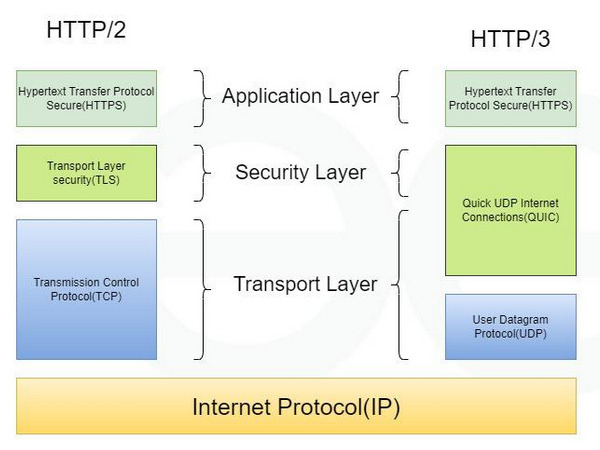
    • QUIC Protocol: HTTP/3 is built on QUIC, a modern transport protocol that runs over UDP (User Datagram Protocol). This replaces the use of TCP (Transmission Control Protocol) found in its predecessors (HTTP/1.1 and HTTP/2).

    • Enhanced Reliability: It replaces TCP’s three-way handshake with faster connection setups. QUIC uses 0-RTT and 1-RTT handshakes, which reduces delay and contributes to faster connection setup.

    • RFC Standard: HTTP/3 is defined in RFC 9114.

    2. Performance and Efficiency

    • Elimination of HOL Blocking: HTTP/3 eliminates Head-of-Line (HOL) blocking at the transport layer. Unlike HTTP/2, if a packet is lost, it only affects individual streams, meaning delays in one part do not block the rest of the website.

    • Faster Start Time: It provides a significantly faster start time, making website connections begin up to 80–90% faster than HTTP/2.

    • Better Performance on Weak Networks: It offers better performance on mobile and high-latency networks. It handles bad or unstable internet connections more smoothly and can recover from lost data effectively.

    • Connection Migration: HTTP/3 supports connection migration, which is particularly useful for users on mobile networks.

    3. Security and Compatibility

    • Built-in Encryption: It includes built-in encryption. TLS (Transport Layer Security) is mandatory and is integrated directly into QUIC, specifically using TLS 1.3.

    • Modern Network Compatibility: HTTP/3 works well with modern networks because it uses UDP on port 443, which is already commonly used on the internet.

    • Browser Support: It is already supported by major browsers including Chrome, Firefox, and Safari.

    HTTP/3 acts like a modern multi-lane highway constructed specifically for data, where individual accidents (lost packets) affect only one lane, allowing the rest of the traffic (data streams) to continue moving rapidly, unlike previous protocols where a single accident could halt the entire road (HOL blocking).

  • Remarkable
    November 6, 2018

    Remarkable

    Remarkable. The best markdown editor for Linux (and Windows soon).

    Read more
  • Remarkable
    Remarkable Remarkable

    Remarkable. The best markdown editor for Linux (and Windows soon).

    Remarkable is a fully featured markdown editor. It is characterized as a powerful, customizable markdown editor primarily available for Linux.

    The principal functionalities and features of Remarkable are:

    Core Editing and Interface

    • Live Preview: Remarkable offers a Live Preview feature, allowing users to see their changes as they make them without needing to export the document first to check the syntax.

    • Synchronized Scrolling: The Live Preview is accompanied by synchronized scrolling.

    • Customizable Views: The editor is completely customizable; users can swap views, hide views, and more.

    • Night Mode: It includes a night mode option.

    Markdown and Content Features

    • Github Flavoured Markdown: Remarkable supports Github Flavoured Markdown.

    • Syntax: It utilizes a simple, easy-to-learn syntax.

    • Specific Features: Supported features include checklists, highlighting, links, images, and more.

    • MathJax Support: It includes MathJax Support to render beautiful, rich documents with advanced formatting.

    • Code Documentation: The code users write is highlighted in the Live Preview, making Remarkable useful for writing software documentation or taking lecture notes.

    Productivity and Export

    • Keyboard Shortcuts: The platform supports Keyboard Shortcuts to enable maximum productivity and offer a great way to speed up markdown formatting.

    • Custom CSS: Users can style their markdown documents however they like by using their own Custom CSS if the default styles are not desired.

    • Export Formats: Remarkable allows users to export their files to PDF and HTML from within the app.

    • Export Quality: The exported HTML code is prettified, and the exported PDFs have a TOC (Table of Contents).

    Availability

    • Platform: Remarkable is a powerful markdown editor available for Linux. It is also mentioned in the context of Windows.

    • Cost and Installers: The Linux version can be downloaded for free (with an option to donate). Easy installers are available for systems including Debian, Ubuntu, Fedora, SUSE, and Arch.

  • Class Central
    November 6, 2018

    Class Central

    Class-Central allows you to find the best free online courses from prestigious university.

    Read more
  • Class Central
    Class Central Class Central Class Central

    Class-Central allows you to find the best free online courses from prestigious university.

    Class Central functions as a universal aggregator for online courses. Its core mission is to help users find the best courses on almost any subject, wherever they exist.

    Here are the principal functionalities and features of Class Central:

    1. Course Aggregation and Scope

    • Vast Catalog: Class Central aggregates courses from a huge number of educational sources.

    • University Coverage: It includes courses from 1300+ Universities, noting institutions such as Harvard University, Yale University, MIT, Columbia University, and IIT Kharagpur. It specifically mentions courses from 1000+ universities.

    • Provider Network: It aggregates content from 100 Providers (e.g., Coursera, Google Skills, AWS Skill Builder, LinkedIn Learning) and 1700+ Institutions (e.g., Google, Amazon, Microsoft, IBM).

    • Free Resources: The service highlights access to 600 Free Google Certifications, 450+ Free Google Certificates, and 300+ Free Coursera Courses. It also features a massive list of Thousands of Free Certificates and Badges.

    2. Organization and Discovery

    • Subject Categorization: Courses are organized into major Subjects, including Computer Science, Health & Medicine, Mathematics, Business, Humanities, Engineering, Science, Education & Teaching, Social Sciences, Art & Design, Artificial Intelligence, Data Science, Programming, Personal Development, and Information Security (InfoSec).

    • Detailed Collections: Subjects are further broken down into specific Collections. Examples include Algorithms and Data Structures (under Computer Science), Anatomy (under Health & Medicine), and Digital Media (under Art & Design).

    • Browsing: Users can browse courses by subject or university.

    3. Rankings and Reviews

    • Ranking System: Class Central provides Rankings based on over 250,000 reviews written by Class Central users.

    • Best Courses: Ranking categories include Best Courses, Best of All Time, and Best of the Year (e.g., 2022, 2021).

    • Popularity: It tracks Most Popular Courses (e.g., Most Popular of All Time, Most Popular of the Year 2024, 2023).

    4. User and Community Features

    • Learning Management: Users can Sign up or Log in.

    • Lists: The service allows users to Organize and share their learning with Class Central Lists, with millions of lists created.

    • Bookmarks: Users can bookmark courses (with over 20M bookmarks created).

    5. News and Analysis ("The Report")

    • Educational News: Class Central publishes "The Report" which provides the latest news and analysis in online education.

    • Recent Topics: Articles cover issues like instructor protests, online learning deals, AI grading, and new degrees.

    • Guides: It features Best Courses Guides on various topics, such as Biology, GRC (Governance, Risk & Compliance), and GRE Prep.

  • Yunohost
    November 6, 2018

    Yunohost

    YunoHost is a server operating system aiming to make self-hosting accessible to everyone.

    Read more
  • Yunohost
    Yunohost Yunohost Yunohost

    YunoHost is a server operating system aiming to make self-hosting accessible to everyone.

    YunoHost is an open-source system designed to help users "Garden your own piece of the Internet!". It is characterized as a system that installs itself on a server and allows users to install and maintain digital services (apps) that they control with very little technical knowledge.

    The principal functionalities and features of YunoHost are:

    Core Management and Automation

    • Server Management: YunoHost allows users to easily manage a wide range of services, including a server, a cloud, a website, mailboxes, a wiki, a social network, a video library, a blog, surveys, an accounting board, a game server, a forum, a chat, and an ERP.

    • Simplified Installation: Users can install applications from an app catalog in just a few clicks.

    • Initial Setup Guidance: The system guides the user through setting up the first administrator, the domain name, and their Internet router.

    • Data Control: The primary benefit is installing and maintaining digital services that you control.

    • Maintenance: Users are encouraged to "Take care of your server".

    • Backup Management: It allows users to Set up backups.

    Diverse Use Cases

    YunoHost facilitates the deployment of services for friends, associations, and companies:

    • For Individuals and Friends:

      • Synchronize calendars and contacts.

      • Keep passwords and notes safe.

      • Host mailboxes.

      • Organize photos, videos, and music.

      • Join alternative social media.

    • For Small Organizations:

      • Host their own website.

      • Share files in common (e.g., with Nextcloud).

      • Edit multiple documents in real time.

      • Manage accounting.

      • Set up a team chat.

    Architecture and Philosophy

    • Installation Flexibility: YunoHost can be installed on various hardware supports, including an ARM board / Raspberry Pi, an Old tower or portable (ordinosaur), or an Online server (VPS).

    • Project Ethos: YunoHost is a non-profit, technocritical project maintained by volunteers.

    • Vision: The project advocates for a decentralized Internet using open and interoperable technologies that respect privacy and empower people.

    • Sustainability Goal: It aims to give materiality back to the digital and encourages sobriety and reuse.

  • Monica
    November 13, 2018

    Monica

    Monica, Open source personal CRM. Monica helps you organize the social interactions with your loved ones.

    Read more
  • Monica
    Monica Monica Monica

    Monica, Open source personal CRM. Monica helps you organize the social interactions with your loved ones.

    Monica is an open source personal CRM (Customer Relationship Management) designed to help users organize social interactions with their loved ones. Its primary goal is to empower people to be a better friend, family member, or spouse by helping them remember important details and follow up on relationships.

    Here is a summary of its key features and functionalities:

    Relationship and Contact Management

    • Centralized Rolodex: Monica provides an easy-to-use interface to store everything known about loved ones, acting as a personal rolodex.

    • Contact Management: It includes general contact management.

    • Detailed Information Storage: Users can quickly and easily log specific information, including:

      • Information about family and pets.

      • Work information.

      • Relations between contacts.

      • Activities done together.

      • Gift ideas or gifts made.

      • Debts owed or owned.

    • Powerful Dashboard: The service features a powerful dashboard.

    Organization and Follow-Up Tools

    • Reminders: Users can set reminders about important dates (such as wedding anniversaries).

    • Tasks: The system allows users to manage tasks.

    • Journaling: Monica includes a Journal feature, which also allows users to indicate how their day went.

    • Follow-Up: It helps users follow up and strengthen their relationships.

    Technical and Security Features

    • Open Source: Monica is open source, meaning the code is publicly available and scrutinized by thousands. This transparency ensures the application’s security.

    • Deployment Options: Users can sign up for free online (no credit card required) or install it on their own server for an additional level of security.

    • Privacy Focus: It is not a social network but a private place for your eyes only. It is guaranteed to be without any ads or malicious software that reads user data, ensuring peace of mind concerning the data (the creators do "nothing, in fact," with user data).

    Monica is specifically designed for people who are busy finding a work/life balance but still want to maintain important social connections.

  • 33 JS concepts
    November 13, 2018

    33 JS concepts

    33 concepts every JavaScript developer should know.

    Read more
  • 33 JS concepts
    33 JS concepts

    33 concepts every JavaScript developer should know.

    33 JavaScript Concepts repository is hosted on GitHub by leonardomso (Leonardo Maldonado). This repository serves as a comprehensive open source educational guide for developers focusing on mastering JavaScript fundamentals.

    Here is a summary of its primary features and functionalities, along with the foundational GitHub features that support it:

    I. Core Repository Content (33-js-concepts)

    • Educational Purpose: The repository aims to help developers master their concepts in JavaScript. It is explicitly described as a guide for future studies and was considered by GitHub as one of the top open source projects of 2018.

    • Structured Curriculum: The core feature is a detailed Table of Contents outlining 33 essential JavaScript concepts. These concepts range across various levels of complexity and cover:

      • Execution and Scoping: Call Stack, Message Queue and Event Loop, setTimeout, setInterval and requestAnimationFrame, Function Scope, Block Scope and Lexical Scope.

      • Data and Typing: Primitive Types, Value Types and Reference Types, Implicit, Explicit, Nominal, Structuring and Duck Typing, and the differences between == vs === vs typeof.

      • Object and Inheritance Models: Factories and Classes, this, call, apply and bind, Prototype Inheritance and Prototype Chain, Object.create and Object.assign.

      • Functional Programming: map, reduce, filter, Pure Functions, Side Effects, Closures, High Order Functions, Recursion, Partial Applications, Currying, Compose and Pipe.

      • Asynchronicity: Promises and async/await.

      • Performance and Architecture: Data Structures, Expensive Operation and Big O Notation, Algorithms, and Design Patterns.

    • Rich Resources: Each concept is accompanied by extensive external resources, including References (MDN), numerous explanatory Articles, and educational Videos.

    • Community and Translation: The project encourages community involvement through submitting Pull Requests (PRs) for adding recaps or reviews. It is highly translated, with versions available in languages such as Arabic, Chinese, Brazilian Portuguese, Spanish, Turkish, Russian, French, German, and many others.

    • Technical Details: The repository is public, primarily written in JavaScript (100.0%), and licensed under the MIT License.

    II. GitHub Platform Features (Context)

    As this educational resource lives on GitHub, it is supported by the platform's comprehensive tools:

    • AI Code Creation: GitHub provides tools like GitHub Copilot (to write better code with AI), GitHub Spark (to build and deploy intelligent apps), GitHub Models (to manage and compare prompts), and the MCP Registry (to integrate external tools).

    • Developer Workflows: Features to automate and manage development include Actions (to automate any workflow), Codespaces (for instant dev environments), Issues (to plan and track work), and Code Review (to manage code changes).

    • Application Security: The platform supports Code security (to secure code as you build), Secret protection (to stop leaks), and the add-on GitHub Advanced Security (to find and fix vulnerabilities).

    • Exploration and Learning: Users can search code, repositories, users, issues, and pull requests. The platform also offers resources like a Documentation hub, a Blog, a Marketplace, and GitHub Skills.

    • Enterprise Solutions: For businesses, GitHub offers an Enterprise platform (an AI-powered developer platform), Copilot for Business (enterprise-grade AI features), and Premium Support.

  • OpenMoji
    November 13, 2018

    OpenMoji

    OpenMoji, Open-source emojis for designers, developers and everyone else!

    Read more
  • OpenMoji
    OpenMoji OpenMoji OpenMoji OpenMoji

    OpenMoji, Open-source emojis for designers, developers and everyone else!

    OpenMoji is an open source project providing emojis for designers, developers, and everyone else.

    Key Content and Scope

    • Vast Collection: OpenMoji features 4292 Emojis designed so far across many categories.

    • Standard Support: It carefully supports the Unicode Emoji standard, specifically version 16.0.

    • Flags: The collection includes 270 Flags, ranging from Andorra to Zimbabwe and even Pirates.

    • Special Categories: OpenMoji ships with various special interest categories beyond the standard Unicode set, including Special Interest Categories for Technologies and Design.

    Design and Quality

    • Handcrafted and Consistent: All emojis are handcrafted, having been carefully designed, tested, and reviewed over many iterations. They are consistent, following a single style guide so they fit perfectly together.

    • Style Variants: The project supports a wide range of use cases by offering both colored and outlined (or Black) emojis.

    • Skin Tones: OpenMoji supports the Fitzpatrick skin tones scale and multiple skin tone combinations.

    Usage and Availability

    • Free to Use: All emojis are free to use under the CC BY-SA 4.0 license.

    • Available Formats: The service provides emojis in several formats:

      • SVG Color and SVG Black.

      • PNG Color in 72×72 and 618×618 sizes.

      • PNG Black in 72×72 and 618×618 sizes.

    • Applications: An OpenMoji App for iOS is available, and they also offer proof-of-concept/Beta versions of OpenMoji Fonts, though these are not intended for production use.

    • Origin: The project is the effort of 80+ students and 2 professors of the HfG Schwäbisch Gmünd, along with many external contributors.