Open Source & Free Tools for Web Workers

Discover amazing tech resources, carefully handpicked to keep you up-to-date and elevate your efficiency. Already 1504 badass resources curated.

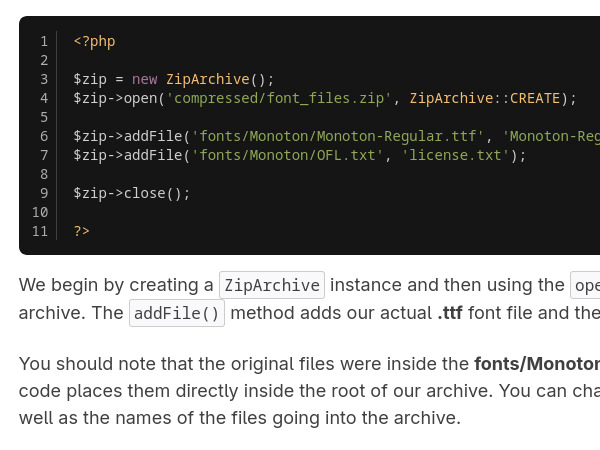
  • How to Zip and Unzip files in PHP
    October 16, 2018

    How to Zip and Unzip files in PHP

    Learn how to zip and unzip a file in PHP by Monty Shokeen.

    Read more
  • How to Zip and Unzip files in PHP
    How to Zip and Unzip files in PHP

    Learn how to zip and unzip a file in PHP by Monty Shokeen.

    This tutorial focuses on how to automate file compression and extraction (zipping and unzipping) using PHP extensions.

    The principal characteristics and functionalities described are centered around the PHP ZipArchive class:

    1. Benefits of File Compression

    Compressing files when transferring them over the internet offers several advantages:

    • Reduced Size: The total size of files is significantly lowered.

    • Bandwidth Saving: Compression helps save bandwidth.

    • Faster Downloads: Users benefit from faster download speeds.

    • Automation: Using PHP functions eliminates the tiresome process of manual compression.

    2. Core Archive Management (Opening and Flags)

    To start, a new ZipArchive instance is created, followed by calling the open($filename, [$flags]) method. Key optional flags determine how the archive is handled:

    • ZipArchive::CREATE: Creates a new archive if one does not exist.

    • ZipArchive::OVERWRITE: Overwrites existing contents in the specified archive.

    • ZipArchive::EXCL: Results in an error if the archive already exists.

    • ZipArchive::RDONLY: Allows opening the archive in read-only mode (available since PHP 7.4.3).

    • Using combinations (e.g., ZipArchive::OVERWRITE|ZipArchive::CREATE) allows overwriting an existing archive while simultaneously creating a new one if none is found.

    3. Adding Files (Compression)

    Once the archive is opened, files can be added:

    • Individual Files: The addFile($filename, $localname, $start, $length) method adds a file from a given path to the archive. The $localname parameter sets the file's name inside the archive.

    • Multiple Files/Directory Matching: The addGlob($pattern, $flags, $options) method is used to archive multiple files (e.g., all .pdf or .png files).

      • The $options parameter (an associative array) controls the directory structure inside the archive.

      • Options include add_path (prefixing the file's local path) and removeallpath (removing everything from the path except the file name, adding it to the archive root).

    • After adding files, the close() method is called to save changes and close the archive.

    4. Extracting Content

    The extractTo($destination, $entries) method is used to extract archive contents:

    • It can extract everything inside the archive (if the second parameter is omitted) or specific files.

    • When extracting specific files, the proper path of the file inside the archive must be specified.

    • The directory and file structure are preserved during the extraction process.

    5. Archive Modification and Control

    The ZipArchive class provides further control over the archived contents:

    • Counting Files: The number of files can be counted using the count() method or the numFiles property.

    • Renaming: The renameName($oldname, $newname) function changes a file's name within the archive.

    • Deleting: The deleteName() method can delete an individual file or an entire directory from the archive.

  • Sylius
    October 30, 2018

    Sylius

    Sylius, an Open Source eCommerce framework on Symfony.
    Read more
  • Sylius
    Sylius Sylius Sylius Sylius

    Sylius, an Open Source eCommerce framework on Symfony.

    Sylius is an Open Source Headless eCommerce Platform designed as an eCommerce framework for creating any online shopping experience for B2C and B2B operations, particularly catering to mid-market and enterprise brands that require custom solutions.

    The principal functionalities and characteristics of Sylius are:

    Headless Architecture and Agility

    • Headless Commerce Platform: Sylius is built as a Headless eCommerce Platform.

    • API Readiness: It is Ready for Headless & PWA (Progressive Web Apps). It comes equipped with a powerful REST API (built with API Platform) that can be customized and integrated with a frontend of choice or a microservices architecture.

    • Customization and Agility: The platform is Designed for Agility & Customisability. It supports the professional development of projects, allowing for the evolution of a digital stack.

    Performance and Scalability

    • Unlimited Scalability: Sylius offers Unlimited Scalability.

    • Hosting Flexibility: It is Easy to host & scale. It functions well on a standard VPS but can also be used with Docker and Kubernetes to become a truly scalable stack on cloud providers with optimal costs.

    Developer Experience and Quality Assurance

    • Developer Experience (DX): Sylius provides an astonishing Developer Experience.

    • Quality Standards: It maintains high Quality Standards and No Technical Debt, favoring an evolutionary approach over periodic revolutions.

    • Automated Testing: It is a pioneer in automated testing of eCommerce platforms and ensures the projects are Tested & Testable.

    • Behavior Driven Development (BDD): It encodes the Behavior Driven Development approach in projects, which helps teams focus on business value.

    Ecosystem and Solutions

    • Industry Focus: Sylius offers solutions tailored to specific sectors, such as the Fashion industry and the Home and garden industry.

    • Integrations: Users can browse various Sylius plugins and integrations.

    • Premium Offering: A premium product, Sylius Plus, is also available.

    • B2B Accelerator: It includes features like ELESTO, a B2B project accelerator Store.

  • Gitea
    October 30, 2018

    Gitea

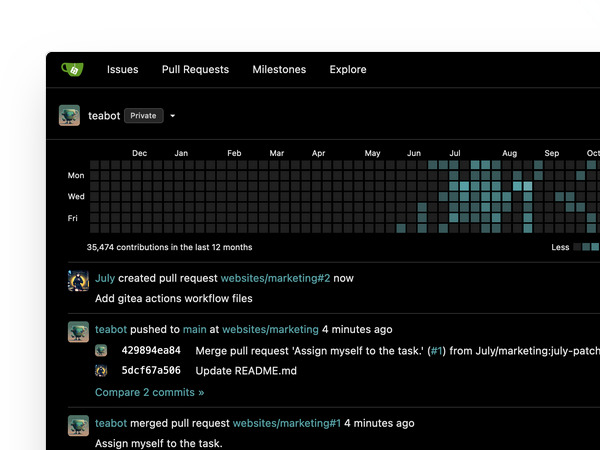
    Gitea is a painless self-hosted Git service. Gitea is a community managed fork of Gogs, lightweight code hosting solution written in Go and published under the MIT license.

    Read more
  • Gitea
    Gitea Gitea Gitea

    Gitea is a painless self-hosted Git service. Gitea is a community managed fork of Gogs, lightweight code hosting solution written in Go and published under the MIT license.

    Gitea, is a Private, Fast, Reliable DevOps Platform. It is primarily known as a powerful, open-source (MIT licensed) and self-hosted option for version control, designed to bring teams high-efficiency with easy operations, from planning through to production.

    The principal functionalities and features of Gitea are:

    Core Platform and Deployment

    • Version Control: Gitea enables the creation and management of repositories based on Git. It is an essential part of the workflow for hosting Git repositories.

    • Open Source & Self-Hosted: It is a free, self-hosted Git service under the MIT license, offering full control, unlimited users, and repositories. Users can choose to run a free DevOps instance themselves.

    • Universal Compatibility: Gitea offers universal compatibility and can be run anywhere. It is compatible with diverse operating systems, including Linux, Windows, macOS, and FreeBSD, and supports environments like Kubernetes.

    • Database Integration: It offers seamless integration with various databases, including SQLite, MySQL, PostgreSQL, TiDB, and MS SQL.

    • Flexible Deployment: It supports flexible deployment options, including both single server setups and replication configurations.

    Development Workflow and Quality

    • Code Hosting and Review: Gitea facilitates code review, which is incredibly easy and convenient, thereby enhancing code quality.

    • Projects and Planning: It allows for the efficient management of requirements, features, and bugs through issue tasks, labeling, and kanban boards. These tools help plan and track development progress using branches, tags, milestones, assignments, time tracking, and dependencies. Key features include Issue tracking and Pull requests.

    • CI/CD (Continuous Integration/Continuous Delivery): Gitea features an integrated CI/CD system called Gitea Actions. This system offers near compatibility with GitHub Actions. Users can create workflows using the familiar YAML format or reuse thousands of existing GitHub Actions within their Gitea instances.

    Package Management and Tooling

    • Package Support: Gitea supports more than 20 different kinds of public or private package management, including Cargo, Composer, Container, Helm, Maven, NPM, NuGet, Pub, PyPI, RubyGems, and Vagrant.

    • Command Line Tool: Gitea provides the Tea Command line tool to interact with Gitea Servers.

    • API and Webhooks: Functionality can be extended using API and webhooks to create custom workflows.

    • Integrations: It integrates with external tools and services, including:

      • Chat Tools: Seamless synchronization with tools like Slack, Discord, MS Teams, and Lark.

      • External CI/CD Services: Compatibility with services like Github Actions, Drone, Woodpecker, ArgoCD, and Jenkins.

    Commercial Offerings

    • Gitea Cloud: A paid option for individual developers and enterprise users that offers the fastest way to get a DevOps instance in minutes.

    • Gitea Enterprise: A paid, enhanced Gitea version designed for enterprise users, which includes advanced features such as SAML SSO Integration, Audit Logs, and priority support.

  • ProBot
    October 30, 2018

    ProBot

    GitHub Apps to automate and improve your workflow. Use pre-built apps to extend GitHub, and easily build and share your own.
    Read more
  • ProBot
    ProBot ProBot

    GitHub Apps to automate and improve your workflow. Use pre-built apps to extend GitHub, and easily build and share your own.

    Probot is an infrastructure designed for creating GitHub Apps to automate and improve your workflow.

    The principal functionalities of Probot are twofold:

    1. Workflow Automation via Apps

    Probot allows users to Use pre-built apps to extend GitHub or to easily build and share your own. These apps function as first class actors within GitHub and automate common development tasks:

    • Release Management: Drafting release notes as pull requests are merged into the main branch (e.g., using Release Drafter).

    • Code Quality & Review: Offering functionalities like a Code review bot powered by ChatGPT.

    • Pull Request Management:

      • Preventing the merging of Pull Requests based on defined configurations (e.g., using Mergeable).

      • Preventing the merging of Pull Requests that contain "WIP" (Work In Progress) in the title.

      • Keeping repository forks up-to-date (e.g., using Pull).

    • Configuration Management: Allowing the use of Pull Requests to manage repository settings (e.g., using Settings).

    • General Interaction: Apps can listen for GitHub events (like issues.opened) and perform automated actions, such as creating comments.

    2. Development and API Features

    Probot provides a platform optimized for developers looking to build custom automation tools:

    • GitHub Optimization: Probot is Optimized for GitHub. Apps are designed to Receive webhooks and use the authenticated client to access the GitHub API.

    • Security: It enforces Granular permissions, ensuring each app only accesses the data it needs and nothing more.

    • Ease of Scripting: It is Easily scriptable using a simple API built on the latest ES6 JavaScript features, allowing developers to Focus on what you want to build by hiding unnecessary details.

  • Kakoune
    November 13, 2018

    Kakoune

    Kakoune is a code editor that implements Vi’s "keystrokes as a text editing language" model. As it’s also a modal editor, it is somewhat similar to the Vim editor (after which Kakoune was originally inspired).

    Read more
  • Kakoune
    Kakoune Kakoune

    Kakoune is a code editor that implements Vi’s "keystrokes as a text editing language" model. As it’s also a modal editor, it is somewhat similar to the Vim editor (after which Kakoune was originally inspired).

    Kakoune is an open source, modal text editor. It was developed to provide a better code editing environment than traditional Vi/Vim clones.

    Here is a summary of Kakoune's main features and functionalities:

    Core Editing Model and Grammar

    • Modal Editing: Like other modal editors, Kakoune operates in different modes, primarily insert mode (for character insertion) and normal mode (for command execution).

    • Text Editing Language: Kakoune provides a text editing language where commands are composable, allowing programmers to express complex changes efficiently. This makes operations like navigating, copying, pasting, and reformatting easily accessible.

    • Object-Verb Grammar: Kakoune improves upon the Vi model by using an object followed by verb grammar (instead of verb followed by object). This structure is fundamental to its interactive nature.

    • Unified Selection and Motion: In Kakoune, moving is selecting. Simple motion commands, like w (go to the next word), select the text from the current position to the destination. Capital commands often expand the current selection.

    Interactivity and Predictability

    • Instantaneous Visual Feedback: Kakoune provides visual feedback on every command. Because the object is selected first, users always see the current selection before applying the change, allowing them to correct errors immediately.

    • Predictable Commands: Commands are conceptually simple, designed to do one single thing (e.g., d deletes only what is currently selected). Complex actions are achieved through the combination of these simple building blocks.

    • Speed: Kakoune is designed to be fast, often requiring fewer keystrokes than Vim in most use cases.

    Multiple Selections

    • Central Feature: Multiple selections is the central way of interacting with text in Kakoune.

    • Structural Selection: This feature provides a powerful means to express structural selection by allowing users to subselect matches inside current selections, split selections on a regex, or keep selections containing a specific match.

    • Complex Operations: Multiple selections simplify complex operations such as global text replacement, converting case styles (e.g., snake_case to camelCase), swapping arguments, and aligning variables using the & command.

    • Regrouping Text: A special pasting function (<a-p>) allows pasting every yanked selection to regroup text gathered from different places.

    Discoverability and Completion

    • Discoverability Mechanisms: Kakoune uses extensive completion support and auto-information display to make up for the lack of traditional GUI menus.

    • Auto-Information Box: An information box describes commands, detailing what they do, optional switches, and parameters. This box also appears when prefix commands (like g for goto) are hit, listing available options. It can even be set to display an explanation after each normal mode keystroke.

    • Fuzzy Matching Completion: Kakoune uses fuzzy matching (subsequence-based) for completion during both insert mode and prompt mode.

    • Intelligent Code Completion: Insert mode completion can suggest words from the buffer, files, or receive candidates from an external source, enabling intelligent code completion.

    Unix Integration and Extensibility

    • POSIX System Integration: Kakoune is designed to integrate seamlessly with the POSIX system.

    • Shell Integration: Commands like | allow users to pipe current selections through a shell command (such as a filter) and replace the selection contents with the command's output.

    • Controllable from Shell: The editor is easily controllable from the shell using kak -p <session> to execute commands.

    • Extension Model: The extension model is based on shell scripting and shell expansion (%sh{...}).

    • Asynchronous Tasks: Combined with support for fifo buffers, the extension model easily handles asynchronous tasks (like grep or make), displaying results as they arrive.

    • Client/Server Design: Kakoune uses a client/server design where the editing session runs on a server process, and multiple clients can connect to display different buffers. This allows it to leave window management to the system's window manager or terminal multiplexer (like tmux).