Open Source & Free Tools for Web Workers

Discover amazing tech resources, carefully handpicked to keep you up-to-date and elevate your efficiency. Already 1498 badass resources curated.

  • happyconf.net
    Sponsor

    happyconf.net

    Animated slideshows to showcase your speakers, sponsors, organisers, announcements and quotes. Plus handy tools to make your life easier: a remote-controlled countdown timer, a clock, and a prize draw for attendees.

    Read more
  • happyconf.net
    happyconf.net happyconf.net happyconf.net happyconf.net happyconf.net happyconf.net happyconf.net happyconf.net

    Animated slideshows to showcase your speakers, sponsors, organisers, announcements and quotes. Plus handy tools to make your life easier: a remote-controlled countdown timer, a clock, and a prize draw for attendees.

    happyconf.net is a web-based platform designed to transform inactive conference screens into professional, animated displays and provide organizers with practical event management tools.

    The main features of this service include:

    • Animated Slideshows: It allows organizers to create elegant presentations to highlight speakers, showcase sponsors, share announcements, and display quotes from the event.

    • Integrated Event Utilities: Beyond slides, the platform includes a remote-controlled countdown timer, a large room clock, and a fair prize draw system to entertain and inform attendees during breaks.

    • Web-Based and Installation-Free: The service runs entirely in a web browser, requiring no software installation; it can be projected onto any connected screen, TV, or projector.

    • Professional Visual Themes: Users can choose from ready-made themes like "Cyberpunk," "Glassy," or "Romantic," or request a fully custom theme to match their specific graphic identity.

    • Real-Time Dashboard: Content is managed through a private admin area, and the public display updates in real time as changes are made.

    • Event-Based Pricing Model: Instead of a recurring subscription, it offers a "pay-per-event" system with tiers (Starter, Pro, and Custom) tailored to different event sizes, from small meetups to large professional conferences.

    • Privacy and Data Sovereignty: To display content, a login is required; once an event is over, all user data is typically deleted to ensure privacy.

  • Eagle
    November 6, 2018

    Eagle

    Eagle.js is a web-based slideshow framework for Vue.js. It supports animations, themes, interactive widgets (for web demos), and makes it easy to reuse components, slides and styles across presentations.

    Read more
  • Eagle
    Eagle Eagle Eagle

    Eagle.js is a web-based slideshow framework for Vue.js. It supports animations, themes, interactive widgets (for web demos), and makes it easy to reuse components, slides and styles across presentations.

    Eagle.js is a hackable slideshow framework built with Vue.js. It is designed to allow users (often referred to as "hackers") to easily craft custom presentations.

    The principal functionalities and features of Eagle.js are categorized as follows:

    1. Core Technology and Architecture

    • Foundation: Eagle.js is a slideshow system built on top of Vue 2.

    • Hackability: It offers maximum hackability by making all APIs public, encouraging users to get "off the beaten tracks" and implement new ideas. The framework achieves this by using the slideshow component as a Vue mixin.

    • Components: Its basic building blocks are the slideshow and slide components.

    • Language Support: The syntax examples primarily use Pug, but plain HTML is also supported.

    • Dependency Management: The core is lightweight, relying on various helpful extensions. It uses animate.css for slide transitions (which must now be installed as a peer dependency).

    2. Presentation Features and Structure

    • Customization and Reuse: It facilitates the easy reuse of components, slides, and styles across different presentations.

    • Animations: The framework supports animations and custom slide transitions using the eg-transition component, which supports animate.css classes.

    • Steps for Interaction: Slides can be configured with steps (:steps=N) to control the sequential appearance of content (e.g., bullet points) using Vue's conditional rendering (v-if='step >= N').

    • Nested Slideshows: It supports inserted (parent is a slideshow) and embedded (parent is a slide) nested presentations.

    3. User Interaction and Navigation

    • Input Controls: Navigation is supported via keyboard and mouse clicks or scroll events.

    • Zoom Functionality: The framework supports a zoom feature where users can zoom in and out of a slide using Alt + Click (Option + Click on non-Mac devices).

    • Navigation Modes: Users can configure navigation to move backward by step (default) or by slide (landing on the first step of the previous slide).

    • Mobile Support: Eagle.js supports basic mouse, keyboard, and touch events, though advanced gestures like 'swipe' require manual integration (e.g., using Hammer.js).

    4. Extensions (Widgets and Plugins)

    The framework includes two types of extensions:

    • Widgets (Used in a Slide): These are Vue components that can be used directly within a slide. Examples include:

      • eg-modal.

      • eg-code-block (for code highlighting, requiring the user to install and configure highlight.js).

      • eg-toggle, eg-radio-button, eg-triggered-message.

    • Plugins (Used Globally in a Slideshow): These enhance slide behavior across the presentation. Examples include:

      • Presenter Plugin: Enables a presenter mode (toggled by a configurable key, default 'p') that opens two windows (parent and child) which share control and can be used for private notes.

      • Zoom Plugin: Enables the zoom functionality.

    5. Customization and Development

    • Theming: Users can apply pre-built themes, such as argume and gourmet, by importing the necessary CSS and wrapping the presentation template with the corresponding theme class (e.g., eg-theme-gourmet).

    • API Access: Developers can customize the framework by accessing and modifying slideshow methods like nextStep, previousStep, nextSlide, and previousSlide.

    • Permalinks: Although not included by default, permalinks (using hashbangs or history mode) can be easily implemented using Vue-Router to maintain slide and step state in the URL.

  • PeerTube
    November 6, 2018

    PeerTube

    PeerTube. Take back control of your videos. A decentralized video hosting network, based on free software.
    Read more
  • PeerTube
    PeerTube PeerTube PeerTube PeerTube

    PeerTube. Take back control of your videos. A decentralized video hosting network, based on free software.

    PeerTube is an open-source, decentralized video-sharing platform developed by Framasoft, a French non-profit organization. It is promoted as a free and decentralized alternative to Big Tech's video platforms.

    Here are the principal functionalities and features of PeerTube:

    Core Philosophy and Architecture

    • Decentralization and Federation: PeerTube is not a single centralized platform. It allows users to create their own independent video platforms. These individual platforms connect to each other to form a big network (federation) that is both autonomous and interconnected. This decentralizes video storage and decision-making power.

    • Privacy and Ethics: The platform is free, open-source, and non-commercial. It does not depend on any advertising and does not track you. It considers users as people, not products to be profiled.

    • Open Source and Transparency: PeerTube is provided freely, allowing users to look under the hood of its source code (it is auditable and transparent). It can be enhanced by contributions from anyone.

    • Community Support: PeerTube exists thanks to donations, with over 90% of its funding coming from public interest contributions.

    • Interoperability: It is based on ActivityPub to connect with other federated tools like Mastodon.

    Broadcasting and Performance

    • Peer-to-Peer (P2P) Broadcasting: PeerTube uses WebRTC, a free and open-source project, to enable peer-to-peer broadcasting.

    • Bandwidth Reduction: P2P reduces server bandwidth overload, especially if a video becomes viral.

    Features for Viewers

    • Mobile Access: A mobile app is available to discover, watch, and share videos across the entire federated network using a single interface.

    • Smooth Experience: The powerful video player offers quality settings, subtitles, and full-screen mode. The experience is comfortable and respectful, working without tracking or ads.

    • Offline Viewing: Users can download videos and watch them offline without needing a premium subscription.

    • User Customization: Viewers can personalize the interface with themes, filtering, NSFW settings, and autoplay preferences.

    • Content Management: Users can save videos for later, organize playlists, resume playback, and check watch history.

    • Discovery: Users can easily browse thousands of channels and videos from across multiple PeerTube instances. They can follow channels and access new videos in a dedicated feed.

    Features for Content Creators

    • Content Synchronization: Creators can let PeerTube automatically synchronize a channel from a remote platform (e.g., Youtube, Vimeo).

    • Editing and Analytics: Creators can access detailed analytics and edit videos (trim, add watermarks, intro/outro) or upload new versions.

    • Live Streaming: The platform supports streaming via OBS or other RTMP software, with the ability to enable replays and interact with viewers via live chat.

    • Channel Management: Creators can manage multiple channels that can be followed by ActivityPub platforms for greater discoverability.

    • Mobile Publishing (Upcoming): Future features include the ability to publish videos directly from a smartphone and edit metadata or view statistics using the video manager.

    Features for Administrators (Instance Owners)

    • Full Control: Administrators have full control and customization through various settings, plugins, and themes.

    • Branding and Layout: They can customize the homepage using Markdown/HTML, set instance branding (avatar, banner, categories), and define default user settings.

    • Moderation Tools: Administrators build, manage, and moderate their own platforms. They can manage user registrations, assign moderator roles, review abuse reports, block or ban users, and mute accounts or platforms.

    • Advanced Features: They can set upload limits and utilize advanced video transcoding, including using remote runners.

  • What is HTTP3
    November 6, 2018

    What is HTTP3

    What is HTTP/3? How it is Different From HTTP/2?

    Read more
  • What is HTTP3
    What is HTTP3

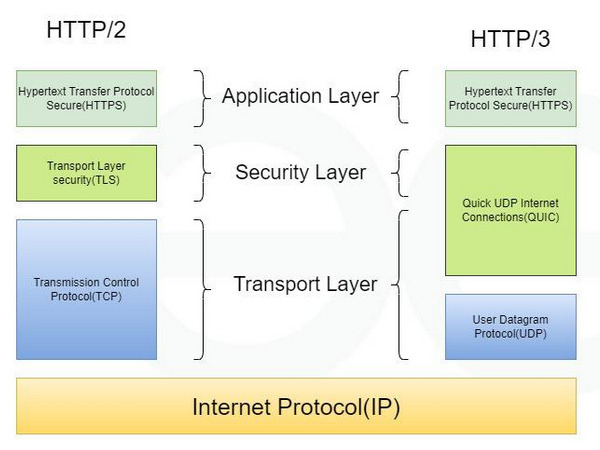
    What is HTTP/3? How it is Different From HTTP/2?

    HTTP/3 is the third major version of the Hypertext Transfer Protocol (HTTP). This protocol is the foundation of data communication on the web.

    Here are the key features of HTTP/3:

    1. Core Protocol and Architecture

    • QUIC Protocol: HTTP/3 is built on QUIC, a modern transport protocol that runs over UDP (User Datagram Protocol). This replaces the use of TCP (Transmission Control Protocol) found in its predecessors (HTTP/1.1 and HTTP/2).

    • Enhanced Reliability: It replaces TCP’s three-way handshake with faster connection setups. QUIC uses 0-RTT and 1-RTT handshakes, which reduces delay and contributes to faster connection setup.

    • RFC Standard: HTTP/3 is defined in RFC 9114.

    2. Performance and Efficiency

    • Elimination of HOL Blocking: HTTP/3 eliminates Head-of-Line (HOL) blocking at the transport layer. Unlike HTTP/2, if a packet is lost, it only affects individual streams, meaning delays in one part do not block the rest of the website.

    • Faster Start Time: It provides a significantly faster start time, making website connections begin up to 80–90% faster than HTTP/2.

    • Better Performance on Weak Networks: It offers better performance on mobile and high-latency networks. It handles bad or unstable internet connections more smoothly and can recover from lost data effectively.

    • Connection Migration: HTTP/3 supports connection migration, which is particularly useful for users on mobile networks.

    3. Security and Compatibility

    • Built-in Encryption: It includes built-in encryption. TLS (Transport Layer Security) is mandatory and is integrated directly into QUIC, specifically using TLS 1.3.

    • Modern Network Compatibility: HTTP/3 works well with modern networks because it uses UDP on port 443, which is already commonly used on the internet.

    • Browser Support: It is already supported by major browsers including Chrome, Firefox, and Safari.

    HTTP/3 acts like a modern multi-lane highway constructed specifically for data, where individual accidents (lost packets) affect only one lane, allowing the rest of the traffic (data streams) to continue moving rapidly, unlike previous protocols where a single accident could halt the entire road (HOL blocking).

  • Remarkable
    November 6, 2018

    Remarkable

    Remarkable. The best markdown editor for Linux (and Windows soon).

    Read more
  • Remarkable
    Remarkable Remarkable

    Remarkable. The best markdown editor for Linux (and Windows soon).

    Remarkable is a fully featured markdown editor. It is characterized as a powerful, customizable markdown editor primarily available for Linux.

    The principal functionalities and features of Remarkable are:

    Core Editing and Interface

    • Live Preview: Remarkable offers a Live Preview feature, allowing users to see their changes as they make them without needing to export the document first to check the syntax.

    • Synchronized Scrolling: The Live Preview is accompanied by synchronized scrolling.

    • Customizable Views: The editor is completely customizable; users can swap views, hide views, and more.

    • Night Mode: It includes a night mode option.

    Markdown and Content Features

    • Github Flavoured Markdown: Remarkable supports Github Flavoured Markdown.

    • Syntax: It utilizes a simple, easy-to-learn syntax.

    • Specific Features: Supported features include checklists, highlighting, links, images, and more.

    • MathJax Support: It includes MathJax Support to render beautiful, rich documents with advanced formatting.

    • Code Documentation: The code users write is highlighted in the Live Preview, making Remarkable useful for writing software documentation or taking lecture notes.

    Productivity and Export

    • Keyboard Shortcuts: The platform supports Keyboard Shortcuts to enable maximum productivity and offer a great way to speed up markdown formatting.

    • Custom CSS: Users can style their markdown documents however they like by using their own Custom CSS if the default styles are not desired.

    • Export Formats: Remarkable allows users to export their files to PDF and HTML from within the app.

    • Export Quality: The exported HTML code is prettified, and the exported PDFs have a TOC (Table of Contents).

    Availability

    • Platform: Remarkable is a powerful markdown editor available for Linux. It is also mentioned in the context of Windows.

    • Cost and Installers: The Linux version can be downloaded for free (with an option to donate). Easy installers are available for systems including Debian, Ubuntu, Fedora, SUSE, and Arch.

  • Monica
    November 13, 2018

    Monica

    Monica, Open source personal CRM. Monica helps you organize the social interactions with your loved ones.

    Read more
  • Monica
    Monica Monica Monica

    Monica, Open source personal CRM. Monica helps you organize the social interactions with your loved ones.

    Monica is an open source personal CRM (Customer Relationship Management) designed to help users organize social interactions with their loved ones. Its primary goal is to empower people to be a better friend, family member, or spouse by helping them remember important details and follow up on relationships.

    Here is a summary of its key features and functionalities:

    Relationship and Contact Management

    • Centralized Rolodex: Monica provides an easy-to-use interface to store everything known about loved ones, acting as a personal rolodex.

    • Contact Management: It includes general contact management.

    • Detailed Information Storage: Users can quickly and easily log specific information, including:

      • Information about family and pets.

      • Work information.

      • Relations between contacts.

      • Activities done together.

      • Gift ideas or gifts made.

      • Debts owed or owned.

    • Powerful Dashboard: The service features a powerful dashboard.

    Organization and Follow-Up Tools

    • Reminders: Users can set reminders about important dates (such as wedding anniversaries).

    • Tasks: The system allows users to manage tasks.

    • Journaling: Monica includes a Journal feature, which also allows users to indicate how their day went.

    • Follow-Up: It helps users follow up and strengthen their relationships.

    Technical and Security Features

    • Open Source: Monica is open source, meaning the code is publicly available and scrutinized by thousands. This transparency ensures the application’s security.

    • Deployment Options: Users can sign up for free online (no credit card required) or install it on their own server for an additional level of security.

    • Privacy Focus: It is not a social network but a private place for your eyes only. It is guaranteed to be without any ads or malicious software that reads user data, ensuring peace of mind concerning the data (the creators do "nothing, in fact," with user data).

    Monica is specifically designed for people who are busy finding a work/life balance but still want to maintain important social connections.