Open Source & Free Tools for Web Workers

Discover amazing tech resources, carefully handpicked to keep you up-to-date and elevate your efficiency. Already 1500 badass resources curated.

  • Remote Rocketship
    Sponsor

    Remote Rocketship

    Find Your Dream Remote Job. Search 100,000+ work from home jobs at top remote companies. Loved by 10,000+ remote workers

    Read more
  • Remote Rocketship
    Remote Rocketship Remote Rocketship Remote Rocketship Remote Rocketship

    Find Your Dream Remote Job. Search 100,000+ work from home jobs at top remote companies. Loved by 10,000+ remote workers

    Remote Rocketship is a powerful job search platform designed to help you land your dream remote career by uncovering thousands of opportunities that other job boards miss.

    Here are the key benefits that give you a competitive edge:

    • Access to "Hidden" Jobs: Unlike traditional job boards that require companies to pay for listings, Remote Rocketship scrapes the entire internet daily to find jobs directly from company websites. This ensures you don't miss out on positions from top companies that choose not to use paid platforms like LinkedIn.

    • A Crucial Head Start: In a competitive market, being first matters. The tool finds jobs as soon as they are posted, allowing you to submit your application before the competition even knows the role exists.

    • Effortless Job Hunting: Instead of manual searching, you can set up daily email alerts that deliver the latest openings tailored to your specific interests directly to your inbox.

    • Hyper-Targeted Search: You can filter through over 100,000 remote jobs using granular criteria such as minimum salary, tech stack (e.g., Python, AWS), visa sponsorship (H1B), or even "no degree required" roles.

    • Global and Diverse Opportunities: The platform covers a vast range of industries—including AI, Fintech, Cybersecurity, and Marketing—and tracks remote-friendly roles in the US, Canada, Europe, Brazil, and worldwide.

    • Authenticity and Trust: Built originally as a personal tool to help the founder's wife find work, the service focuses on providing legitimate, up-to-date work-from-home listings by checking company websites multiple times a day.

      The website link is an affiliate link.

  • Shipfast
    Sponsor

    Shipfast

    Ship your startup in days, not weeks. Shipfast is a NextJS boilerplate with all you need to build your SaaS, AI tool, or any other web app and make your first $ online fast.

    Read more
  • Shipfast
    Shipfast Shipfast Shipfast Shipfast Shipfast

    Ship your startup in days, not weeks. Shipfast is a NextJS boilerplate with all you need to build your SaaS, AI tool, or any other web app and make your first $ online fast.

    ShipFast is a comprehensive NextJS boilerplate designed to help entrepreneurs and developers launch startups as quickly as possible, ideally within minutes. It provides a pre-configured foundation that includes all the essential "plumbing" of a modern web application so users don't have to build common features from scratch.

    The main features of the tool include:

    • Full-Stack Infrastructure: It comes integrated with Next-Auth for user authentication (supporting Google OAuth and Magic Links) and offers out-of-the-box support for databases like MongoDB and Supabase.

    • Ready-to-Use UI Components: The boilerplate includes a wide array of React components specifically for conversion, such as pricing tables, FAQ sections, testimonials, and "Hero" sections.

    • Monetization & Communication: It features built-in integrations for Stripe subscriptions and payments, along with email handling systems for tools like Mailgun or Resend.

    • Optimized for Growth: The tool is pre-configured with SEO best practices, analytics, and customer support modules to help a new business scale.

    • Security & Reliability: It incorporates essential security features such as rate limiting, schema validation, and security headers to protect the application.

    • Centralized Customization: Most of the app's behavior is controlled through a single config.js file, which acts as the backbone of the application and simplifies the setup process.

    The project structure is designed for efficiency, with dedicated directories for API routes, database models, and library helper functions, allowing for a clean and scalable codebase.

  • DesignCode
    March 14, 2019

    DesignCode

    Complete courses about the best tools and design system. 5 free courses with the free plan.

    Read more
  • DesignCode
    DesignCode DesignCode DesignCode

    Complete courses about the best tools and design system. 5 free courses with the free plan.

    Design+Code is a comprehensive educational platform that bridges the gap between design and development, teaching users how to build professional-grade applications for iOS, Web, and more using modern tools and AI assistance.

    The main features of this tool include:

    • Extensive Course Library: It offers over 300 hours of video content across 50+ courses and 320+ premium tutorials covering React, SwiftUI, Flutter, and Figma.

    • AI-Powered Workflows: The platform teaches students to leverage cutting-edge AI tools like Claude AI, Midjourney, Cursor, and Ideogram to accelerate both design inspiration and code generation.

    • Industry-Standard Tool Mastery: Courses focus on mastering the most in-demand platforms and design tools, including Figma, Sketch, Xcode, and Spline.

    • Practical, Real-World Projects: Learning is centered around building real apps from scratch, providing students with access to source files for hands-on practice.

    • Certification & Career Support: Users can earn certificates of completion to enhance their professional profiles and receive significant discounts on popular design tools like Aura and Angle.

    • Multi-Platform Expertise: It includes specific tracks for building responsive websites, cross-platform mobile apps (iOS/Android), and even advanced 3D UI for visionOS.

  • JavaScript de Zéro
    March 11, 2019

    JavaScript de Zéro

    In this serie of video courses, Jérémy Mouzin helps you learn JavaScript (ES6+) without any programming knowledge. The first module is free and dedicated to beginners but Jérémy is working hard to prepare three other modules to let you become an intermediate, advanced and expert JS programmer. (For French listener)

    Read more
  • JavaScript de Zéro
    JavaScript de Zéro

    In this serie of video courses, Jérémy Mouzin helps you learn JavaScript (ES6+) without any programming knowledge. The first module is free and dedicated to beginners but Jérémy is working hard to prepare three other modules to let you become an intermediate, advanced and expert JS programmer. (For French listener)

    JavaScript de Zéro is a professional training and mentorship program created by Jérémy Mouzin, an embedded software engineer, designed to guide aspiring developers from total beginners to professional web developers.

    The main features of this program include:

    • Comprehensive Technical Curriculum: The training focuses on mastering HTML, CSS, JavaScript, and Algorithmics, which are identified as the essential pillars for success in the industry.

    • Personalized Mentorship: Unlike self-taught paths, this program provides direct technical and moral support via phone or video calls to ensure students remain motivated and get immediate answers to their questions.

    • Focus on Algorithmic Logic: A dedicated module uses the DECAPI method to teach students how to solve complex problems and pass technical interviews on platforms like CodinGame.

    • Fighting Common Roadblocks: The curriculum is specifically designed to help students overcome "Blank Page Syndrome," "Imposter Syndrome," and "Tutorial Hell" by fostering complete autonomy.

    • Professional Tools & Workflow: Students learn to use high-value tools like the debugger and official documentation, training them to work independently like seasoned professionals.

    • Career Coaching: The program includes advice on building a CV, LinkedIn profile, and portfolio to help students secure their first job or freelance client.

    • Lifetime Access & Flexibility: Students receive lifetime access to all course materials and future updates, with a 4-hour free introductory module available to test the training quality.

  • JavaScript Info
    February 27, 2019

    JavaScript Info

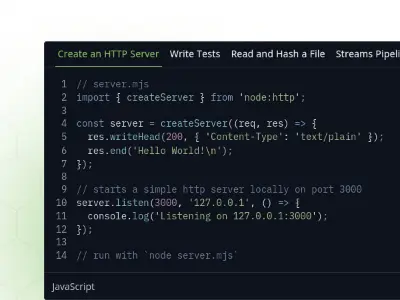
    The modern Javascript tutorial. Learn JavaScript from the basics to advanced topics with simple, but detailed explanations.
    Read more
  • JavaScript Info
    JavaScript Info JavaScript Info

    The modern Javascript tutorial. Learn JavaScript from the basics to advanced topics with simple, but detailed explanations.

    The Modern JavaScript Tutorial is a comprehensive, open-source educational resource designed to take learners from the absolute basics of JavaScript to advanced professional concepts through detailed explanations.

    The main features of this resource include:

    • Structured Learning Path: The tutorial is divided into three major sections: the core JavaScript language, working with the browser (DOM, events), and additional specialized articles.

    • Core Language Mastery: It covers fundamental programming concepts from scratch, including data types, loops, and functions, before moving into advanced topics like Object-Oriented Programming (OOP), closures, and prototypes.

    • Browser & Interface Management: Dedicated sections teach students how to manipulate the DOM tree, handle complex UI events (drag-and-drop, keyboard actions), and manage document styles and coordinates.

    • Advanced Web Technologies: The curriculum includes deep dives into modern web features such as Promises, async/await, Fetch API for network requests, WebSockets, and Web Components.

    • Specialized Tooling: It covers essential developer topics like regular expressions, binary data handling, storage (IndexedDB/LocalStorage), and automated testing with Mocha.

    • Global Accessibility: As an open-source project, it is being translated into numerous languages (including French, Spanish, Arabic, and Chinese) to make high-quality coding education available worldwide.

    • Flexible Consumption: Learners can access the material for free online or purchase it in EPUB/PDF formats for offline study.

    • Community Integration: The project features a Discord chat for real-time discussion and a GitHub repository for community contributions and updates.

  • NodeJS Dev
    February 26, 2019

    NodeJS Dev

    Want to learn NodeJS? NodeJS Dev is a good place to start. It presents an introduction to NodeJS with exemple code snippet and clear explanations.

    Read more
  • NodeJS Dev
    NodeJS Dev

    Want to learn NodeJS? NodeJS Dev is a good place to start. It presents an introduction to NodeJS with exemple code snippet and clear explanations.

    Node.js is a powerful JavaScript runtime environment designed to build scalable network applications, offering a comprehensive set of resources for everything from basic scripting to advanced enterprise configurations.

    The main features and learning paths for this tool include:

    • Asynchronous & Non-Blocking Architecture: It leverages the V8 JavaScript engine and a unique Event Loop to handle multiple operations simultaneously without blocking execution.

    • Comprehensive Command Line Tools: Users can run scripts, use the REPL (Read-Eval-Print Loop) for interactive coding, and manage environment variables or I/O directly from the terminal.

    • Robust HTTP & Networking: It provides the built-in capability to build web servers, handle complex HTTP transactions, and manage enterprise network configurations.

    • Direct File System Manipulation: Node.js allows for deep interaction with the OS, including reading and writing files, working with file descriptors, and managing folders across different filesystems.

    • Integrated Package Management: Through npm, users can easily integrate, manage, and publish packages to extend application functionality.

    • Native TypeScript Support: The platform offers dedicated workflows for running TypeScript code, whether through native execution, transpilation, or specialized runners.

    • Built-in Test Runner & Diagnostics: It includes a native test runner with mocking and code coverage capabilities, alongside advanced diagnostic tools like Flame Graphs for profiling performance and memory.

    • Security Best Practices: The resources provide specific guidance on securing applications and managing "Userland" migrations safely.

  • Exploring JS
    February 5, 2019

    Exploring JS

    This book written by Axel Rauschmayer covers ECMAScript 6 in depth, but is structured so that you can also quickly get an overview if you want to. If you are a programmer and want to learn JavaScript (up to and including ECMAScript 5), check out Axel’s book “Speaking JavaScript” (free online).

    Read more
  • Exploring JS
    Exploring JS

    This book written by Axel Rauschmayer covers ECMAScript 6 in depth, but is structured so that you can also quickly get an overview if you want to. If you are a programmer and want to learn JavaScript (up to and including ECMAScript 5), check out Axel’s book “Speaking JavaScript” (free online).

    Exploring ES6 is a comprehensive guide written by Dr. Axel Rauschmayer, specifically designed to help developers transition to ECMAScript 6 (ECMAScript 2015).

    The principal functionalities and characteristics of this resource include:

    1. Targeted and Comprehensive Content

    • Most In-depth Resource: It is described as the most comprehensive book available on ECMAScript 6.

    • For Experienced Developers: The book is specifically tailored for people who already know JavaScript and want to upgrade their skills to the next version of the language.

    • Syntax and Features: It covers the extensive new syntax and features introduced in the ES6 update, making it a "perfect match" for developers using tools like the Babel compiler.

    2. Flexible Access and Formats

    • Free Online Version: A complete version of the book is available for free online for those who wish to read it in a web browser.

    • Offline Ebooks: For those who wish to support the author's work, it is available for purchase in PDF, EPUB, and MOBI formats.

    3. Support and Community Ecosystem

    • Discussion Forum: The author has created a Google Group dedicated to discussing questions and ideas related to the book.

    • Transparency and Updates: The book maintains a public list of errata (errors and typos) and a changelog that records what is added or fixed in each new release.

    4. Expert Author Foundations

    • Proven Track Record: Dr. Axel Rauschmayer specializes in JavaScript and web development, teaching classes and blogging at the well-known site 2ality.com.

    • Long-term Expertise: The author has been writing about ECMAScript 6 since early 2011, ensuring the material is grounded in deep technical knowledge.

  • Learn to Code HTML & CSS
    January 24, 2019

    Learn to Code HTML & CSS

    Learn to Code HTML & CSS is a simple and comprehensive guide dedicated to helping beginners learn HTML and CSS. Outlining the fundamentals, this guide works through all common elements of front-end design and development.
    Read more
  • Learn to Code HTML & CSS
    Learn to Code HTML & CSS Learn to Code HTML & CSS

    Learn to Code HTML & CSS is a simple and comprehensive guide dedicated to helping beginners learn HTML and CSS. Outlining the fundamentals, this guide works through all common elements of front-end design and development.

    Learn to Code HTML & CSS is a comprehensive and interactive guide designed to teach beginners how to develop and style websites from scratch. Created by designer and developer Shay Howe, it covers all the common elements of front-end design and development.

    Here is a summary of its principal functionalities and curriculum:

    Core Educational Curriculum

    The guide is structured into 12 progressive lessons that take a student from absolute basics to professional practices:

    • Structural Foundations: Lessons cover building your first web page, understanding HTML and CSS fundamentals, and mastering the Box Model.

    • Layout and Design: It provides detailed instruction on positioning content, working with typography, and setting backgrounds and gradients.

    • Content Organization: Students learn to create lists, integrate media, organize data using tables, and build functional web forms.

    • Best Practices: The final lesson focuses on "Writing Your Best Code," ensuring students learn industry-standard habits.

    Learning Path and Formats

    • Interactive Learning: The guide is designed as an interactive experience to help beginners effectively acquire front-end skills.

    • Advanced Track: For developers looking to round out their skills, there is a specialized "Advanced HTML & CSS" section for a deeper look at front-end development.

    • Availability: The material is accessible as a web-based guide and is also available for purchase as a physical book.

    • Updates: A newsletter is provided to help students stay up to date when new courses or lessons are posted.

  • Marksheet
    January 18, 2019

    Marksheet

    MarkSheet is a very complete free HTML and CSS tutorial written by Jeremy Thomas, the developer of the Bulma CSS framework.
    Read more
  • Marksheet
    Marksheet Marksheet Marksheet

    MarkSheet is a very complete free HTML and CSS tutorial written by Jeremy Thomas, the developer of the Bulma CSS framework.

    MarkSheet is a free, comprehensive educational resource designed to teach beginners and designers how to build for the web from the ground up. Created by Jeremy Thomas, it offers a structured, 50-lesson path through the core technologies of modern web development.

    The main features of this tool include:

    • Comprehensive 50-Lesson Curriculum: The course is organized into 4 sections and 9 chapters, providing a clear and methodical deep dive into web fundamentals.

    • Foundation for Absolute Beginners: It begins with essential context on the Internet, the World Wide Web, and how browsers function, ensuring students understand the environment they are building for.

    • Core HTML 5 Mastery: A dedicated 13-lesson section covers everything from syntax and semantics to forms and document structure, specifically designed for those ready to start coding immediately.

    • In-Depth CSS 3 Training: With 29 lessons, this extensive section teaches how to define style and layout, covering the Box Model, positioning, responsiveness, and advanced animations or transforms.

    • Advanced Styling with Sass: For developers looking for more efficient workflows, the tutorial includes lessons on Sass variables, nesting, mixins, and inheritance.

    • Step-by-Step Ebook Resource: The creator also offers a companion ebook, "Learn CSS in 44 minutes," which provides a step-by-step guide to building a personal webpage from scratch.

    • Open and Accessible Philosophy: MarkSheet is completely free, licensed under Creative Commons, and its underlying source code is open-sourced under the MIT license.

  • 30 days of Vue.js
    January 14, 2019

    30 days of Vue.js

    Over the next 30 days, Hassan Djirdeh will walk through everything you need to know to work with Vue. From the very beginning through topics like the Vue Instance, Components, and even Testing.
    Read more
  • 30 days of Vue.js
    30 days of Vue.js 30 days of Vue.js

    Over the next 30 days, Hassan Djirdeh will walk through everything you need to know to work with Vue. From the very beginning through topics like the Vue Instance, Components, and even Testing.

    30 Days of Vue (by newline) is a comprehensive, free educational resource designed to take developers from the absolute basics of the Vue.js framework to building professional, production-ready applications through 30 daily lessons.

    The main "features" of this learning tool include:

    • Progressive Curriculum: The course starts with the Vue Instance and reactive data before moving into complex topics like Components, State Management, and Testing.

    • Practical Directives: It provides hands-on examples of essential Vue directives, including v-for for dynamic list rendering and v-model for two-way data binding in forms.

    • Component-Based Architecture: Extensive coverage of building global and local components, using Props to pass data down to children and Custom Events to communicate back up to parents.

    • Advanced Tooling: Introduces professional development tools such as the Vue CLI for project scaffolding and Vue Devtools for browser-based debugging.

    • State Management Mastery: Teaches various ways to handle application-wide data, starting with a Simple Global Store and progressing to the Flux Architecture and Vuex.

    • Routing and Navigation: Dedicated lessons on client-side routing using the official Vue Router library to manage multiple views.

    • Professional Testing: A strong focus on reliability, introducing unit testing concepts and the official Vue Test Utils library.

    • Portable Learning: The entire course is available as a free 330+ page PDF, allowing students to learn offline and at their own pace.

  • Learn JavaScript
    January 12, 2019

    Learn JavaScript

    Learn in an interactive environment. Study short lessons and practice in an intuitive environment based on Tests. Written in French.

    Read more
  • Learn JavaScript
    Learn JavaScript Learn JavaScript Learn JavaScript Learn JavaScript

    Learn in an interactive environment. Study short lessons and practice in an intuitive environment based on Tests. Written in French.

    Learn JavaScript (learnjavascript.online) is an interactive, browser-based educational platform designed to teach modern JavaScript (ES2015+) through a hands-on, project-based approach. It targets beginner developers who have some basic programming experience and aims to prepare them for real-world development by focusing on best practices.

    The first 77 lessons, challenges, and projects (the first 7 chapters) are completely free. After that, you will be asked to upgrade (a one-time payment that gives you access for 5 years) if you want to access the full course.

    This course is written in French.

    The main features of this course include:

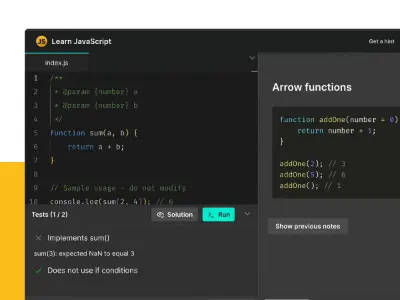
    • Interactive Learning Environment: Users can read concise lessons, save and export personal notes, and complete coding challenges directly in their browser without any external setup.

    • Modern Curriculum: The course covers the full spectrum of modern JavaScript, from fundamentals like variables and functions to advanced concepts like Asynchronous logic, Promises, Fetch, and the Event Loop.

    • Real-World Projects: The platform features 17 projects inspired by popular products, such as a GitHub API repository list, a Todo app using an API, and a comprehensive Food Tracker final project.

    • Integrated Flashcards App: To reinforce learning, the tool includes a separate app with over 250 flashcards that utilize spaced repetition, a proven method for long-term memory retention.

    • Mobile-Friendly Practice: Learners can maintain their progress and continue their studies or review flashcards on their mobile devices.

    • Test-Driven Challenges: The interactive challenges provide a test-driven environment where users can compare their code against official solutions to ensure they are following best practices.

    • Visual Knowledge Tracking: The platform provides a "knowledge map" and lesson recaps to help students visualize their progress and reinforce what they have learned.

    • Developer-Friendly Pricing: Unlike many subscription-based services, it offers a one-time payment for five years of access, following a generous free trial of the first 77 lessons and 7 chapters.

  • Free video series to learn CSS Grid
    September 4, 2018

    Free video series to learn CSS Grid

    Learn CSS Grid with 25 online videos (4 hours) recorded by Wes Bos to learn from fundamentals to real examples.

    Read more
  • Free video series to learn CSS Grid
    Free video series to learn CSS Grid Free video series to learn CSS Grid Free video series to learn CSS Grid Free video series to learn CSS Grid

    Learn CSS Grid with 25 online videos (4 hours) recorded by Wes Bos to learn from fundamentals to real examples.

    CSS Grid. It is important to note that CSS Grid is not a framework or library; instead, it is an addition to the CSS language itself.

    Features:

    Core Functionality and Layout Capabilities

    • Two-Dimensional Layouts: CSS Grid is a brand new layout system in CSS that specifically allows developers to quickly create flexible, two-dimensional layouts.

    • Placement and Sizing: It can be used to place, size, align, and architect designs.

    • Problem Solver: Grid enables the creation of designs that were previously difficult or even impossible using older techniques like floats or Flexbox. The sources note that learning CSS Grid will change the way you create layouts for the web forever.

    Context and Comparison

    • Relationship with Flexbox: While there is a large amount of overlap in functionality between CSS Grid and Flexbox, they both ultimately do their own thing.

    • Syntax: Although CSS Grid uses new syntax and layout ideas, the sources assert that it is fairly simple and can be broken down into a handful of powerful concepts.

    • Browser Integration: Modern browsers, particularly Mozilla Firefox, offer excellent developer tools for Grid, making it easier to understand, debug, and visualize complex grid layouts.

  • How Does Mastodon Work?
    September 11, 2018

    How Does Mastodon Work?

    You have already heard about the Mastodon social network but you still don't understand in detail how it works. Kev Quirk has written two articles to help you understand how it works and how to use it.

    Read more
  • How Does Mastodon Work?
    How Does Mastodon Work?

    You have already heard about the Mastodon social network but you still don't understand in detail how it works. Kev Quirk has written two articles to help you understand how it works and how to use it.

    The article provides a detailed guide explaining how Mastodon, a unique social media platform, works, noting that it can be confusing for new users because it does not function like other mainstream social media sites.

    1. Basic Interaction and Posting (Toots)

    • Toots: The equivalent of a "Tweet" is called a "Toot", which has a default limit of 500 characters.

    • Privacy Settings: Toots can be set to various privacy levels: public (default), unlisted, follower only, or direct.

    • Engagement Tools: Users can @mention other accounts and add media, links, and hashtags. Below every Toot, there are icons to reply, boost, or favourite.

    • Boosting (Re-sharing): Boosting re-shares a Toot to a user's followers. Crucially, users cannot add their own commentary to a boosted Toot, a design choice intended to prevent trolling.

    • Favouriting: Favouriting a Toot signifies support or agreement, similar to a "Like" or "heart" on other platforms.

    2. Federation and Instances (The Fediverse)

    • Unique Concept: The Fediverse (Federation) is a unique concept to Mastodon compared to other mainstream social networks.

    • Instances (Servers): The Mastodon network is made up of individual, completely separate servers called Instances. The concept is likened to email providers (e.g., Gmail, Hotmail), which are run by different companies but can all send emails to one another.

    • Cross-Instance Communication: Users on one instance (e.g., Fosstodon) can "Toot" with thousands of other Mastodon servers globally.

    • Mentioning Users: To mention a user on the same instance, you use the standard @mention format; to mention someone on a different instance, you must use the format @user@instance.name (e.g., @basil@sarcasm.stream). The system includes an auto-complete feature to help populate these handles.

    • Connecting Instances: Instances become connected (federated) when a user on one instance follows a user on another instance. This creates a snowball effect leading to the exponential growth of the Fediverse.

    3. The Three Timelines

    Unlike Twitter's single timeline, Mastodon features three distinct timelines:

    • The Home Timeline: Contains Toots from all the people you follow across the entire Fediverse.

    • The Local Timeline: Displays all public Toots from your specific instance (server). This is useful for discovering new people to follow locally.

    • The Federated Timeline: Contains all Toots from all instances that your server is federated with. This timeline contains posts from thousands of people but may include posts some users find offensive.

    4. Moderation and Control

    • Reporting: Users can Report egregious Toots to the instance staff, who review the report and can take appropriate action, ranging from no action to a warning or banning the user from the Instance.

    • Personal Moderation: Options available include Mute (stops seeing Toots from an account) and Block (prevents the account from interacting with you and mutes their Toots).

    • Filters: Users can set up filters to globally exclude certain keywords (e.g., swear words or specific topics like COVID-19 or hashtags) from their feeds.

    5. Key Advantages of Mastodon

    The article outlines several reasons to use Mastodon over mainstream networks:

    • Open Source: Being open source allows anyone to view the source code, providing reassurance that user data is not being harvested or spied on. It also ensures the project can be forked if the main developer leaves.

    • Chronological Timeline: All three timelines are always chronologically displayed. This avoids the use of "clever" algorithms designed by sites like Facebook and Twitter to artificially increase engagement by changing content order.

    • No Adverts or Tracking: Mastodon has NO ADVERTS, NO SPONSORED POSTS, and NO TRACKING. It is designed to bring people together, not to make money.

    • No Single Owner: Due to the collection of instances, users are not subject to a single site owner. If a user dislikes an instance's direction, they can use a migration tool to move their account to a new instance.

    • Interest-Specific Niches: While many instances are aligned to specific interests (e.g., FOSS-focused instances like Fosstodon), they still encourage discussion on varied topics, and users can follow diverse people on other instances.

  • Mastering markdown
    September 18, 2018

    Mastering markdown

    Yet another video series by Wes Bos. A quick 34 minute mini course for anyone who is looking to learn markdown for the first time, or fill in any gaps along the way.
    Read more
  • Mastering markdown
    Mastering markdown Mastering markdown

    Yet another video series by Wes Bos. A quick 34 minute mini course for anyone who is looking to learn markdown for the first time, or fill in any gaps along the way.

    Mastering Markdown is a mini video series designed to help anyone learn Markdown quickly—whether you’re a beginner or looking to fill in knowledge gaps. The course is about 34 minutes long and promises that Markdown, being a simple language, can be mastered in under an hour. The site focuses on practical, easy-to-follow instruction for writing in Markdown, making it accessible for all skill levels.

  • Introduction to Firebase
    October 16, 2018

    Introduction to Firebase

    As a mobile developer, using a back-end as a service (BaaS) platform can help you swiftly implement your ideas. Firebase has all the key features you need for rapid prototyping and quickly testing out your ideas. Read this introduction to Firebase tutorial written by Deepthi Bhattachar.

    Read more
  • Introduction to Firebase
    Introduction to Firebase

    As a mobile developer, using a back-end as a service (BaaS) platform can help you swiftly implement your ideas. Firebase has all the key features you need for rapid prototyping and quickly testing out your ideas. Read this introduction to Firebase tutorial written by Deepthi Bhattachar.

    The article, titled "Intégration et Authentification Firebase sur iOS" (Firebase Integration and Authentication on iOS), serves as a tutorial and comprehensive guide on integrating and configuring the Firebase back-end as a service (BaaS) platform within an iOS mobile application, with a specific focus on user authentication.

    Here is a summary of the key content:

    Firebase as a Solution for Rapid Prototyping

    The article highlights that mobile applications require a back-end server for user login and data synchronization. Firebase makes it easy for developers to test out ideas quickly—an era characterized by rapid prototyping—by providing essential back-end functionality, such as authentication, database services, and object storage, thus eliminating the need for server-side coding knowledge or time. Furthermore, Firebase includes useful capabilities for prototype validation, including analytics, A/B testing, and push notifications. The service is free for small projects.

    Step-by-Step iOS Integration

    The core of the article outlines the technical steps required to set up an iOS project (named MyFirstFirebaseApp) with Firebase:

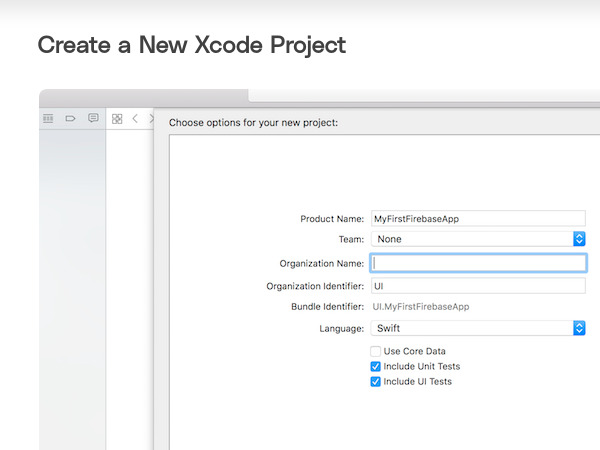
    1. Project Setup: Creating a new Single View App Xcode project.

    2. Dependency Management: Initializing and using CocoaPods to add the prerequisite libraries via the Firebase/Core pod.

    3. Firebase Account Configuration: Creating an account in the Firebase Console (a Google product) and creating a new project. Although free for prototyping, the author notes the need to be aware of the pricing structure for production use.

    4. App Registration: Registering the iOS app, downloading the essential GoogleService-Info.plist file (which contains basic configuration information like client ID, API Key, and database URL), and adding it to the Xcode project.

    5. Initialization: Adding the initialization code (import Firebase and FirebaseApp.configure()) to the AppDelegate.swift file to ensure Firebase is correctly set up when the app launches.

    User Authentication and Management

    The article details the various user management and sign-in options available through the Firebase Dashboard's Authentication section, where developers can choose one or multiple methods:

    • Standard Methods: Email/Password, Google, Facebook, Twitter, GitHub, and Anonymous guest accounts.

    • Phone Authentication: Allows sign-in using a mobile phone number, with Firebase SDK tools for verification. This method is free for the first 10,000 logins per month under the free Spark plan.

    Implementing Phone Authentication

    The tutorial dedicates significant attention to configuring and implementing Phone Authentication in Swift:

    1. Configuration: Requires enabling Phone authentication in the Firebase Console and including the Firebase/Auth pod.

    2. Push Notifications and reCAPTCHA: It necessitates enabling push notifications in the Xcode project. It also requires configuring reCAPTCHA verification (using the REVERSEDCLIENTID in the Xcode URL Schemes) as a fallback mechanism if silent push notifications cannot be received (e.g., when using an iOS simulator or if background refresh is disabled).

    3. Cloud Messaging Setup: The tutorial includes instructions for configuring Firebase Cloud Messaging (FCM) by uploading APNs certificates and the APNs authentication key to the Firebase Console.

    4. Code Implementation: The provided Swift code utilizes RegistrationService to call PhoneAuthProvider.provider().verifyPhoneNumber, which sends a One-Time Password (OTP) to the user's phone. Upon receiving a verificationID, the app prompts the user to input the OTP via an alert dialog. Finally, the signIn method creates a Firebase credential using the verificationId and the OTP, completing the user sign-in process.

  • Class Central
    November 6, 2018

    Class Central

    Class-Central allows you to find the best free online courses from prestigious university.
    Read more
  • Class Central
    Class Central Class Central Class Central

    Class-Central allows you to find the best free online courses from prestigious university.

    Class Central functions as a universal aggregator for online courses. Its core mission is to help users find the best courses on almost any subject, wherever they exist.

    Here are the principal functionalities and features of Class Central:

    1. Course Aggregation and Scope

    • Vast Catalog: Class Central aggregates courses from a huge number of educational sources.

    • University Coverage: It includes courses from 1300+ Universities, noting institutions such as Harvard University, Yale University, MIT, Columbia University, and IIT Kharagpur. It specifically mentions courses from 1000+ universities.

    • Provider Network: It aggregates content from 100 Providers (e.g., Coursera, Google Skills, AWS Skill Builder, LinkedIn Learning) and 1700+ Institutions (e.g., Google, Amazon, Microsoft, IBM).

    • Free Resources: The service highlights access to 600 Free Google Certifications, 450+ Free Google Certificates, and 300+ Free Coursera Courses. It also features a massive list of Thousands of Free Certificates and Badges.

    2. Organization and Discovery

    • Subject Categorization: Courses are organized into major Subjects, including Computer Science, Health & Medicine, Mathematics, Business, Humanities, Engineering, Science, Education & Teaching, Social Sciences, Art & Design, Artificial Intelligence, Data Science, Programming, Personal Development, and Information Security (InfoSec).

    • Detailed Collections: Subjects are further broken down into specific Collections. Examples include Algorithms and Data Structures (under Computer Science), Anatomy (under Health & Medicine), and Digital Media (under Art & Design).

    • Browsing: Users can browse courses by subject or university.

    3. Rankings and Reviews

    • Ranking System: Class Central provides Rankings based on over 250,000 reviews written by Class Central users.

    • Best Courses: Ranking categories include Best Courses, Best of All Time, and Best of the Year (e.g., 2022, 2021).

    • Popularity: It tracks Most Popular Courses (e.g., Most Popular of All Time, Most Popular of the Year 2024, 2023).

    4. User and Community Features

    • Learning Management: Users can Sign up or Log in.

    • Lists: The service allows users to Organize and share their learning with Class Central Lists, with millions of lists created.

    • Bookmarks: Users can bookmark courses (with over 20M bookmarks created).

    5. News and Analysis ("The Report")

    • Educational News: Class Central publishes "The Report" which provides the latest news and analysis in online education.

    • Recent Topics: Articles cover issues like instructor protests, online learning deals, AI grading, and new degrees.

    • Guides: It features Best Courses Guides on various topics, such as Biology, GRC (Governance, Risk & Compliance), and GRE Prep.